
Day 11: Multi-Modal Security & Classification
Building Production-Ready Content Moderation Systems
What We’re Building Today
Today we’re constructing a multi-modal security agent that processes images, documents, and audio streams in real-time. Think Netflix’s content scanning system or Discord’s moderation pipeline - but built for enterprise-scale AI agent architectures.
Key Components:
Real-time image content moderation with malware detection
Document OCR pipeline with PII extraction and classification
Audio processing with speech-to-text and content filtering
Unified moderation dashboard with risk scoring and reporting
Why Multi-Modal Security Matters
Modern AI agents don’t just process text. They handle user uploads, generate media, and interact with diverse content streams. A single compromised image can inject malicious payloads, while leaked PII in documents creates compliance nightmares.
Companies like Zoom learned this the hard way - their initial AI features lacked proper content filtering, leading to policy violations and security breaches. Your agent needs bulletproof content validation before any AI processing begins.
Working Code Demo:
System Architecture Overview
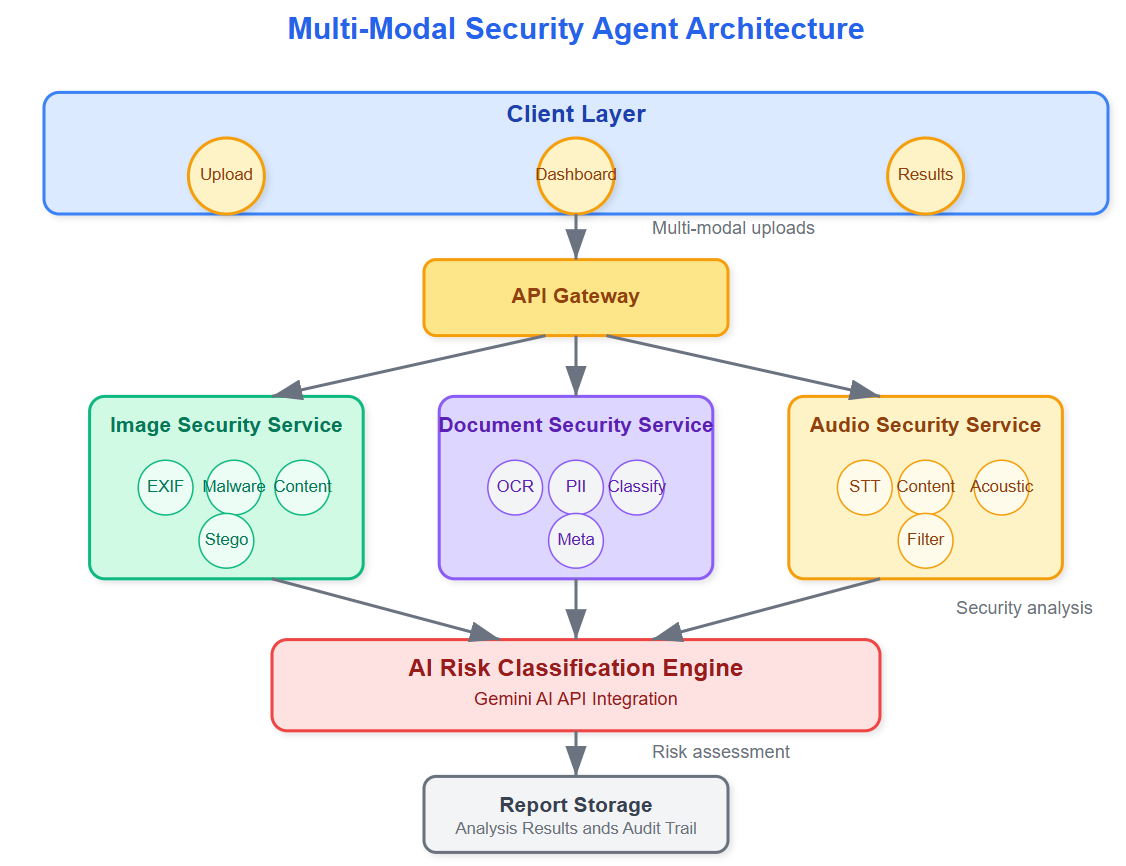
Our system operates in three security layers:
Layer 1: Input Validation - File type verification, size limits, and basic format checks happen at the gateway. This prevents obvious attacks like executable files disguised as images.
Layer 2: Content Analysis - Each modality gets specialized processing. Images undergo computer vision analysis for inappropriate content and steganography detection. Documents get OCR'd and scanned for sensitive patterns. Audio streams are transcribed and analyzed for prohibited content.
Layer 3: Classification & Action - Results from all modalities feed into a unified risk scoring system. High-risk content gets quarantined, medium-risk content gets flagged for review, and clean content proceeds to your AI agent.
Component Deep Dive
Image Security Pipeline
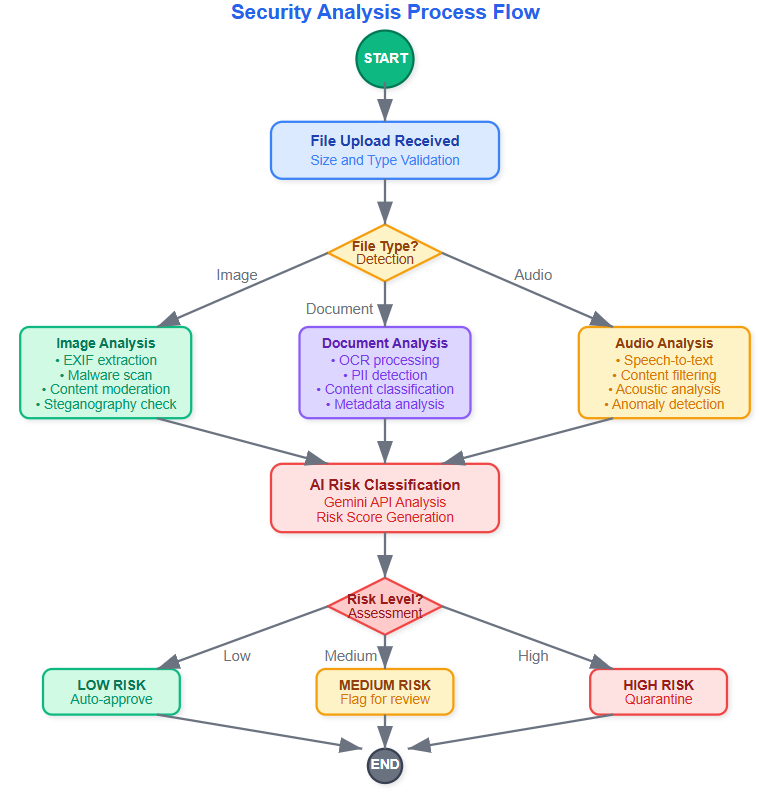
Your image processor isn't just checking for explicit content - it's hunting for hidden threats. Malicious actors embed code in image metadata or use steganography to hide payloads in pixel data.
The pipeline extracts EXIF data, analyzes pixel patterns for anomalies, and runs the image through Google's Vision API for content classification. Each step generates confidence scores that contribute to the final risk assessment.
Document Intelligence Engine
OCR processing reveals more than just text. Document layout analysis detects when sensitive information appears in forms versus casual mentions. The system identifies Social Security numbers, credit card patterns, and even checks against known data breach lists.
Smart classification goes beyond regex patterns. The engine understands context - "SSN: 123-45-6789" in a form gets flagged differently than "SSN example: 123-45-6789" in documentation.
Audio Content Filter
Audio processing combines speech recognition with acoustic analysis. Beyond transcribing words, the system detects emotional stress patterns, background noise anomalies, and even identifies potential deepfake audio signatures.
Real-time streaming analysis means your agent can halt processing mid-conversation if prohibited content emerges, rather than waiting for complete audio files.
State Management & Control Flow
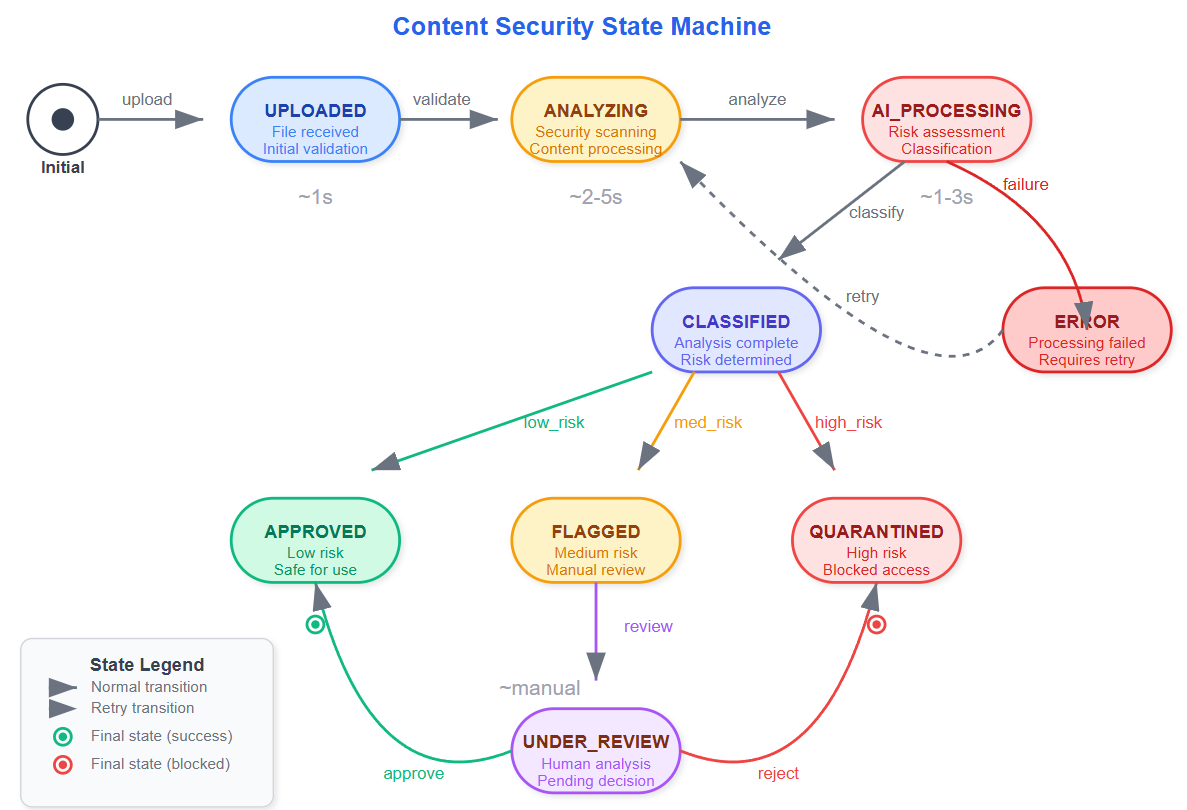
The moderation agent maintains state across multiple processing stages. Content moves from "Received" → "Analyzing" → "Classified" → "Action Taken" with detailed audit trails at each transition.
Failed classification attempts trigger retry logic with exponential backoff. This prevents system overload during high-traffic periods while ensuring no content slips through unprocessed.
Production Integration Patterns
Your security agent integrates seamlessly with existing AI pipelines. Clean content flows directly to downstream processors, while flagged content enters review workflows. The system maintains processing speed through parallel analysis - all modalities process simultaneously rather than sequentially.
Rate limiting and circuit breakers prevent cascade failures when external APIs (like Gemini) experience outages. Local fallback models ensure basic security checks continue even during service disruptions.
Real-World Implementation Insights
Enterprise deployments require careful balance between security and user experience. Overly aggressive filtering creates false positives that frustrate users. Too lenient settings create compliance risks.
The key insight: implement confidence thresholds rather than binary decisions. Content with 85-95% confidence gets human review, while 95%+ confidence triggers automatic actions. This reduces manual overhead while maintaining safety.
Success Metrics & Monitoring
Track false positive rates by content type - images typically have higher accuracy than audio processing. Monitor processing latency to ensure real-time performance requirements are met. Most importantly, measure compliance coverage - what percentage of sensitive content patterns are your systems actually catching?
Implementation Guide
GitHub Link:
https://github.com/sysdr/AI-Agent-Mastery/tree/main/day11/multimodal-security-agentPrerequisites & Setup
Before starting, ensure you have:
Python 3.9+ installed
Node.js 18+ installed
Git for version control
A Gemini AI API key
Quick Start Implementation
Step 1: Project Initialization
# Navigate to your development directory
cd your-development-folder

# The complete project setup script creates all necessary files
# Run the provided implementation script to generate the full project structure
Step 2: API Configuration
# Edit the backend environment file
nano backend/.env

# Add your actual Gemini API key:
GEMINI_API_KEY=your-actual-gemini-api-key-here
ENVIRONMENT=development
DEBUG=True
Step 3: Build and Install Dependencies
# Make scripts executable
chmod +x *.sh

# Run the automated build process
./build.sh
Expected build output:
🚀 Building Multi-Modal Security Agent...
📦 Creating Python virtual environment...
📦 Installing backend dependencies...
📦 Installing frontend dependencies...
✅ Build completed successfully!
Step 4: Start the Application
# Launch all services
./start.sh
Expected startup output:
🚀 Starting Multi-Modal Security Agent...
🔧 Starting backend server...
🎨 Starting frontend development server...
✅ Application started!
📱 Frontend: http://localhost:3000
🔧 Backend API: http://localhost:8000
Testing Your Implementation
Automated Testing Suite
# Run comprehensive tests
./run_tests.sh
What the tests verify:
All security services initialize correctly
File upload processing works for each modality
Risk classification produces valid outputs
Error handling responds appropriately
API endpoints return expected data formats
Manual Feature Testing
Image Analysis Verification:
Open http://localhost:3000 in your browser
Upload a test image (JPG or PNG format)
Verify the analysis shows:
Risk score between 0-100
Threat level classification (LOW/MEDIUM/HIGH/CRITICAL)
EXIF data extraction results
Malware signature analysis
Document Processing Verification:
Upload a PDF or text document
Confirm PII detection identifies sensitive information
Check content classification accuracy
Verify OCR text extraction works properly
Audio Content Verification:
Upload an MP3 or WAV audio file
Confirm speech-to-text transcription appears
Check content moderation flags activate correctly
Verify acoustic anomaly detection functions
API Testing with Command Line
Test individual endpoints directly:
Image Analysis Test:
curl -X POST "http://localhost:8000/api/analyze/image" \
  -H "Content-Type: multipart/form-data" \
  -F "file=@sample_image.jpg"
Document Analysis Test:
curl -X POST "http://localhost:8000/api/analyze/document" \
  -H "Content-Type: multipart/form-data" \
  -F "file=@sample_document.pdf"
Audio Analysis Test:
curl -X POST "http://localhost:8000/api/analyze/audio" \
  -H "Content-Type: multipart/form-data" \
  -F "file=@sample_audio.mp3"
Performance Validation
Load Testing Setup:
# Install Apache Bench for load testing
sudo apt-get install apache2-utils

# Test backend performance under load
ab -n 100 -c 10 http://localhost:8000/api/analyze/image
Performance Targets:
Response time: Under 2 seconds per file
Throughput: Over 50 requests per minute
Memory usage: Less than 512MB per worker process
System Monitoring:
# Monitor backend processes
ps aux | grep uvicorn
top -p $(pgrep -f uvicorn)

# Check frontend performance
ps aux | grep node
Troubleshooting Common Issues
Backend Won't Start:
# Verify virtual environment activation
source venv/bin/activate
which python

# Check dependency installation
pip list | grep fastapi
pip install -r backend/requirements.txt --upgrade
Frontend Build Failures:
# Clear npm cache and reinstall
cd frontend
rm -rf node_modules package-lock.json
npm cache clean --force
npm install
File Upload Errors:
# Ensure upload directories exist with proper permissions
mkdir -p backend/uploads/{images,documents,audio}
chmod 755 backend/uploads/
Gemini API Connection Issues:
# Verify API key length and format
echo $GEMINI_API_KEY | wc -c  # Should be approximately 40 characters
Deployment Verification Checklist
Backend System Checks:
[ ] FastAPI server starts without errors
[ ] All API endpoints respond correctly
[ ] File uploads work for supported formats
[ ] Security analysis returns valid results
[ ] Error handling works properly
[ ] Request logging captures events
Frontend System Checks:
[ ] React application loads without console errors
[ ] File drag-and-drop functionality works
[ ] Analysis results display correctly
[ ] All threat levels render with proper colors
[ ] Dashboard statistics update in real-time
[ ] Mobile responsiveness confirmed
Integration System Checks:
[ ] Frontend communicates successfully with backend
[ ] File uploads process completely end-to-end
[ ] Real-time result updates function properly
[ ] Error states display helpful messages
[ ] Security headers present in responses
[ ] CORS configured correctly for cross-origin requests
System Shutdown
When finished testing:
# Stop all services cleanly
./stop.sh
Assignment Challenge
Extend the system with custom classification models. Train a lightweight CNN to detect your organization's specific content policies - perhaps identifying company logos in user uploads or detecting industry-specific sensitive documents.
Build a feedback loop where human reviewers can correct classification mistakes, and use this data to retrain your models continuously.
Solution Hints
For the assignment challenge:
Use TensorFlow or PyTorch to create custom classification models
Implement active learning techniques to improve model accuracy over time
Create a review interface where humans can provide feedback on classifications
Store feedback data to retrain models periodically
Monitor model drift and performance degradation over time
Next Steps
Tomorrow we'll explore how agents learn from user interactions while maintaining privacy and compliance. You'll discover techniques for behavioral adaptation that improve over time without compromising security - the foundation of truly intelligent AI systems.
The multi-modal security system you've built today becomes the trust foundation for all future agent capabilities. Every piece of content that flows through your AI infrastructure now passes through production-grade security validation, protecting both your users and your business from emerging threats.