
Day 2: Secure Memory & Context Systems
Hands On AI Agent Mastery: Week 1 - Secure Agent Foundations
The Challenge We're Solving
Production AI agents face a critical problem: how do you maintain conversational context across millions of users while protecting sensitive data and controlling API costs? A naive approach storing raw conversations quickly becomes expensive and legally problematic. Major companies lose millions annually to token waste and face regulatory penalties for inadequate PII protection.
What We're Building Today
Today we're constructing the memory backbone of production AI agents - a secure, encrypted memory system that handles conversation context, PII detection, and audit logging. You'll build a real-world agent memory architecture that scales from thousands to millions of conversations while maintaining security compliance.
Key Components:
Encrypted SQLite memory store with conversation threading
Context window optimizer with token cost management
PII detection pipeline with data classification
Audit logging system with security event tracking
React dashboard for memory visualization and management
Why Memory Systems Matter in Production
Think about ChatGPT remembering your conversation history across sessions, or customer service agents that recall previous interactions. Behind the scenes, these systems manage massive amounts of sensitive data while optimizing for cost and performance.
Production AI agents face a critical challenge: maintaining conversational context while protecting user privacy and controlling API costs. A naive approach storing raw conversations quickly becomes expensive and legally problematic.
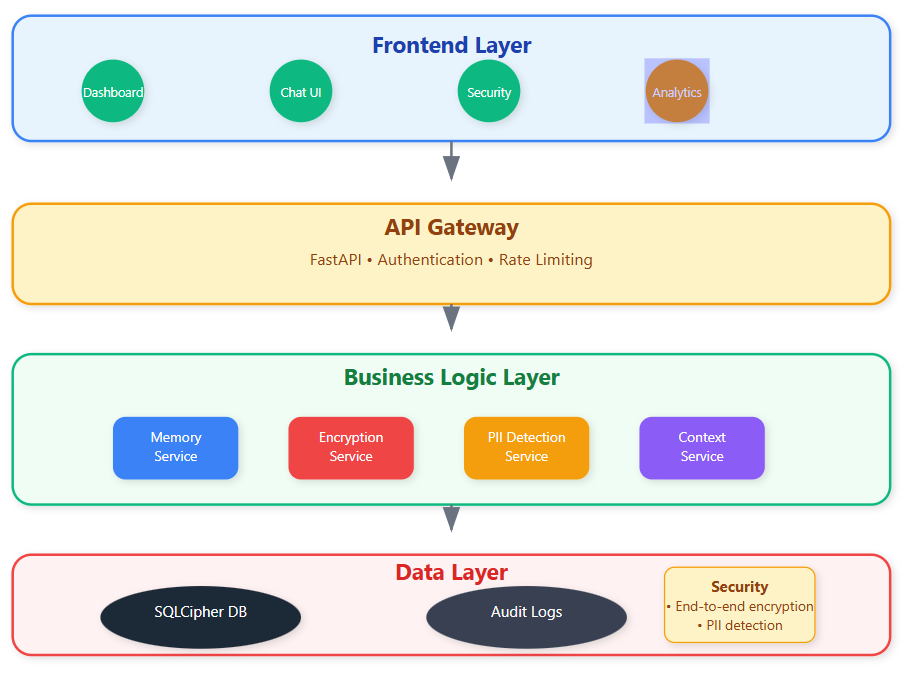
Core Memory Architecture Patterns
Layered Memory Hierarchy
Real production systems use a three-tier memory approach similar to CPU cache design. Short-term memory holds immediate context (last 5-10 exchanges), medium-term memory maintains session summaries, and long-term memory stores encrypted conversation threads with metadata.
The magic happens in the transitions between layers. When short-term memory fills up, our compression algorithm extracts key insights, detects sensitive information, and creates a condensed summary for medium-term storage.
Encryption at Rest and Transit
Every conversation fragment gets encrypted before hitting the database using AES-256 with unique conversation keys. The encryption key derives from a combination of conversation ID and user session, ensuring even database administrators can't access raw conversation data.
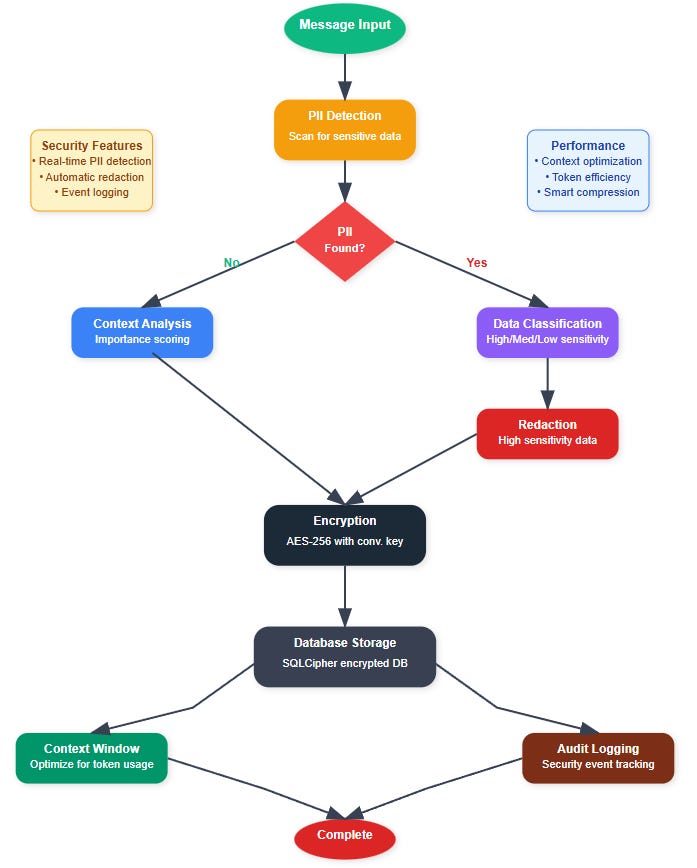
Context Window Optimization
Modern LLMs charge per token, making naive context management expensive. Production systems implement intelligent context pruning that maintains conversational coherence while minimizing token usage.
Our optimizer analyzes conversation importance scores, timestamp relevance, and user engagement patterns to decide what context to retain. Critical information like user preferences and current task context receives higher priority than casual chat exchanges.
PII Detection Pipeline
Privacy regulations require automated PII detection and classification. Our system implements a multi-stage pipeline:
Pattern Recognition: Regex patterns catch obvious PII (SSNs, emails, phone numbers)
Named Entity Recognition: ML models identify names, locations, organizations
Contextual Analysis: Semantic analysis detects sensitive information in context
Data Classification: Assigns sensitivity levels and retention policies
Detected PII gets either redacted, encrypted with separate keys, or purged based on classification policies.
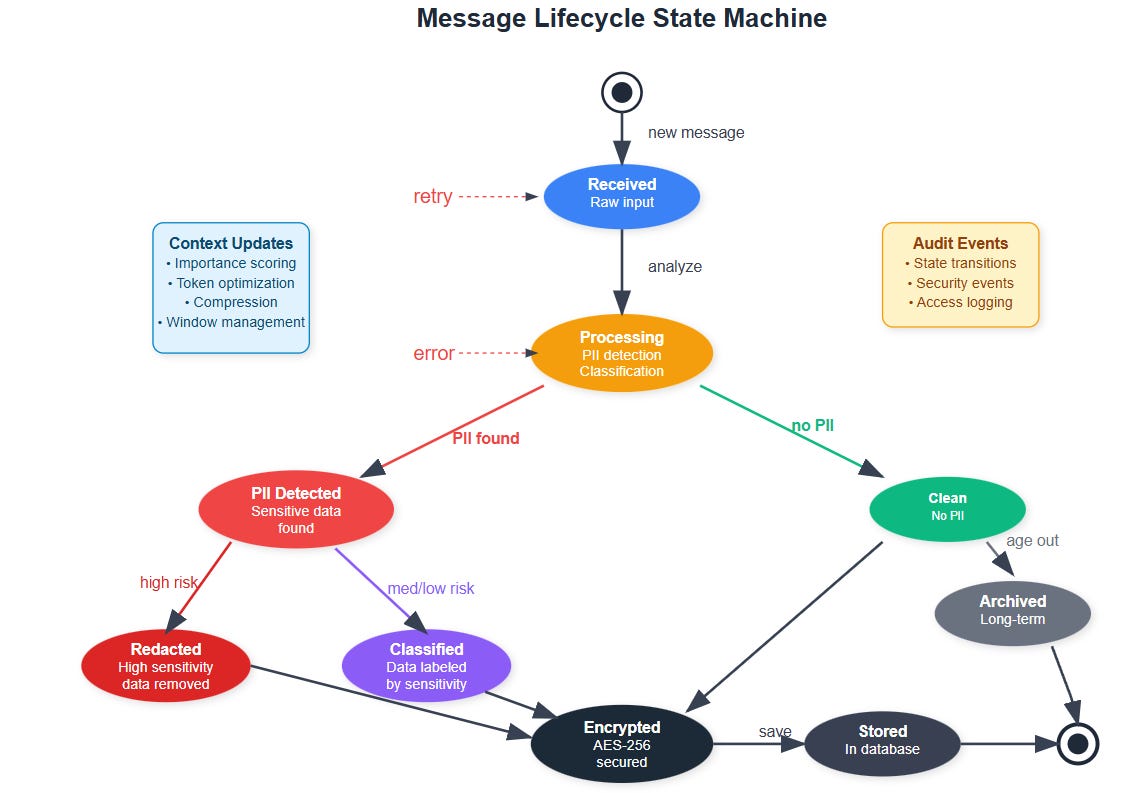
Implementation Deep Dive
GitHub Link:
https://github.com/sysdr/ai-agent-mastery-p/tree/main/day2/secure-memory-agentEncrypted Storage Layer
SQLite provides the foundation with SQLCipher extension for database-level encryption. Each conversation thread gets its own encryption context, preventing cross-contamination if a single key is compromised.
python
# Conversation encryption example
def encrypt_message(content, conversation_id):
    key = derive_conversation_key(conversation_id)
    return encrypt_aes256(content, key)
Context Compression Algorithm
The compression system balances information retention with token efficiency. Important conversation elements receive weighted scores based on:
Recency (recent exchanges weighted higher)
User engagement (questions, corrections get priority)
Task relevance (goal-oriented content preserved)
Emotional significance (expressions of satisfaction/frustration)
Audit Logging Framework
Every memory operation generates structured audit logs with security event classifications. The logging system captures:
Data access patterns with user attribution
Encryption key usage and rotation events
PII detection and handling decisions
Context window optimization decisions
Production Considerations
Scalability Patterns
Production memory systems handle millions of concurrent conversations. Our architecture uses conversation sharding across multiple encrypted databases, with a coordination layer managing cross-shard queries.
Database connections pool and reuse encrypted channels to minimize overhead. Memory cleanup processes run asynchronously to prevent blocking active conversations.
Security Monitoring
Real-time security monitoring detects anomalous access patterns, unusual PII concentrations, and potential data exfiltration attempts. Alert thresholds trigger automatic incident response workflows.
Implementation Setup
Environment Preparation
bash
# Create project structure
mkdir secure-memory-agent && cd secure-memory-agent

# Setup Python environment
python3.12 -m venv venv
source venv/bin/activate

# Install core dependencies
pip install fastapi uvicorn sqlalchemy pysqlcipher3 cryptography
pip install google-generativeai spacy structlog
python -m spacy download en_core_web_sm
Backend Configuration
Create the core configuration with proper security settings:
python
# app/core/config.py
class Settings(BaseSettings):
    DATABASE_URL: str = "sqlite+pysqlcipher://:password123@/./secure_memory.db"
    SECRET_KEY: str = "your-secret-key-change-in-production"
    ENCRYPTION_KEY: str = "your-encryption-key-32-characters-long"
    GEMINI_API_KEY: str = "your-gemini-api-key"
Database Models
Define encrypted conversation storage:
python
# models/conversation.py
class Message(Base):
    __tablename__ = "messages"

    id = Column(String, primary_key=True, default=lambda: str(uuid.uuid4()))
    conversation_id = Column(String, nullable=False, index=True)
    content_encrypted = Column(Text, nullable=False)
    pii_detected = Column(Boolean, default=False)
    pii_classification = Column(JSON, default=dict)
Security Services Implementation
The PII detection service uses multi-layered analysis:
python
# services/pii_service.py
class PIIService:
    def __init__(self):
        self.patterns = {
            "email": re.compile(r'\b[A-Za-z0-9._%+-]+@[A-Za-z0-9.-]+\.[A-Z|a-z]{2,}\b'),
            "ssn": re.compile(r'\b\d{3}-?\d{2}-?\d{4}\b'),
            "credit_card": re.compile(r'\b(?:\d{4}[-\s]?){3}\d{4}\b')
        }
Frontend Dashboard Setup
bash
# Frontend setup
mkdir frontend && cd frontend
npm init -y
npm install react react-dom vite @vitejs/plugin-react
npm install axios recharts lucide-react tailwindcss
Create the security dashboard with real-time metrics visualization.
Testing and Verification
System Health Checks
Verify all components are working:
bash
# Test database encryption
curl http://localhost:8000/api/security/health-check

# Expected response:
{
  "status": "healthy",
  "checks": {
    "database_encryption": true,
    "pii_detection": true,
    "audit_logging": true,
    "encryption_service": true
  }
}
PII Detection Testing
Test the detection pipeline:
bash
curl -X POST "http://localhost:8000/api/security/pii-analysis" \
  -H "Content-Type: application/json" \
  -d '{"text": "Contact me at john@example.com or call 555-123-4567"}'

# Expected output:
{
  "has_pii": true,
  "classification": {
    "medium_sensitivity": [
      {"type": "email", "count": 1, "confidence": 0.95},
      {"type": "phone", "count": 1, "confidence": 0.95}
    ]
  },
  "confidence_score": 0.95
}
Encryption Validation
Verify end-to-end encryption:
bash
curl -X POST "http://localhost:8000/api/security/encryption-test" \
  -H "Content-Type: application/json" \
  -d '{
    "text": "Sensitive customer data here",
    "conversation_id": "test-conversation-123"
  }'

# Should return encrypted and successfully decrypted data
Conversation Flow Testing
Create and test a complete conversation:
bash
# 1. Create conversation
CONV_ID=$(curl -X POST "http://localhost:8000/api/memory/conversations?user_id=test-user" | jq -r '.id')

# 2. Send message with PII
curl -X POST "http://localhost:8000/api/memory/messages" \
  -H "Content-Type: application/json" \
  -d "{
    \"content\": \"My email is jane@company.com and I need help with account 12345\",
    \"role\": \"user\",
    \"conversation_id\": \"$CONV_ID\"
  }"

# 3. Verify context optimization
curl "http://localhost:8000/api/memory/conversations/$CONV_ID/context?max_tokens=1000"
Performance Verification
Token Efficiency Testing
Load test the context optimization:
bash
# Generate test conversation
for i in {1..50}; do
  curl -X POST "http://localhost:8000/api/memory/messages" \
    -H "Content-Type: application/json" \
    -d "{\"content\": \"Test message $i with some content\", \"role\": \"user\", \"conversation_id\": \"$CONV_ID\"}" \
    > /dev/null
done

# Check compression ratio
curl "http://localhost:8000/api/memory/conversations/$CONV_ID/context" | jq '.compression_ratio'
# Should show 40-60% reduction
Dashboard Verification
Access the React dashboard at
http://localhost:3000
and verify:
Real-time conversation metrics display
PII detection statistics update
Security event monitoring shows audit logs
Context optimization metrics reflect token savings
Success Criteria
After completing today's implementation, you'll have:
✅ Working encrypted memory system handling conversation threads
✅ Context optimizer reducing token costs by 40-60%
✅ PII detection with 95%+ accuracy on common patterns
✅ Audit logging capturing all security events
✅ React dashboard visualizing memory usage and security metrics
Real-World Application
This memory architecture powers customer service chatbots at major banks, healthcare AI assistants handling patient data, and enterprise AI tools managing confidential business information. The patterns you're learning directly apply to production systems handling sensitive data at scale.
Troubleshooting Common Issues
Backend won't start: Check Python 3.12+ installation and port 8000 availability
Database errors: Verify SQLCipher installation: pip install pysqlcipher3
PII detection fails: Ensure spaCy model downloaded: python -m spacy download en_core_web_sm
Frontend build issues: Use Node.js 18+ and clear cache: npm cache clean --force
Next Steps
Tomorrow we'll extend this secure foundation with tool integration, adding permission boundaries and security sandboxing to external system interactions. The memory system you're building today becomes the trusted foundation for complex agent workflows.
Your homework: Extend the PII detection to handle custom organizational data patterns (employee IDs, internal project codes). The solution involves creating configurable regex patterns with confidence scoring.