
Day 5: Secure Document Processing
Building Production-Ready Document Intelligence
What We're Building Today
Today we're constructing a secure document processing agent that handles real-world document intelligence tasks. Our system will intelligently chunk text, detect personally identifiable information (PII), classify content types, and extract metadata—all while maintaining enterprise-grade security standards.
Core Components:
Multi-format document processor with virus scanning
PII detection engine with privacy compliance
Content classification system with audit trails
Secure storage layer with access controls
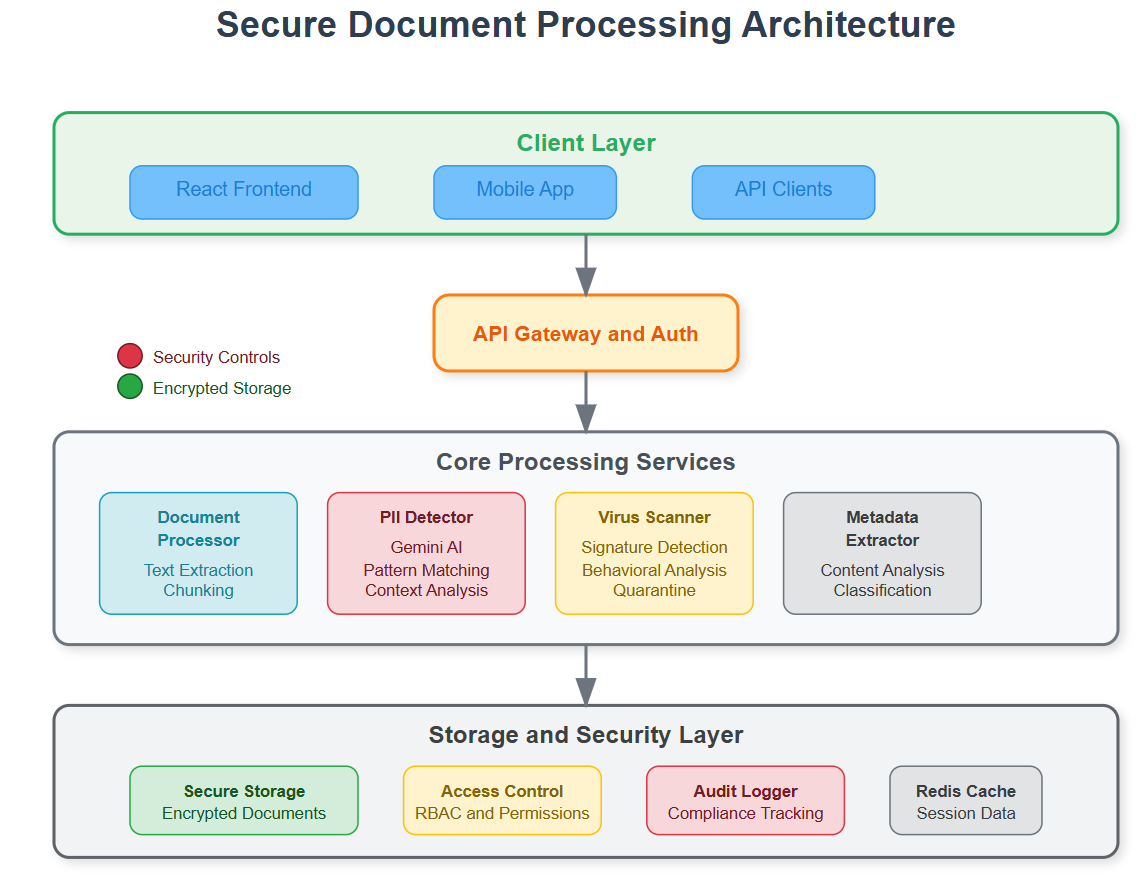
The Document Processing Challenge
Modern AI systems process millions of documents daily. Think about how Google Drive processes your uploads, or how financial institutions handle loan applications. Each document contains sensitive information that requires careful handling, classification, and secure storage.
The challenge isn't just processing—it's doing it securely while maintaining performance at scale. One misconfigured PII detector could expose customer data. One missing virus scan could compromise entire systems.
Component Architecture Deep Dive
Our document agent operates through four interconnected layers that form a secure processing pipeline.
Processing Pipeline Flow:
Intake Layer: Documents enter through secure upload endpoints with immediate virus scanning
Analysis Layer: Content gets chunked, classified, and scanned for PII using Gemini AI
Compliance Layer: Privacy rules apply, audit logs generate, and access controls activate
Storage Layer: Processed documents store with encryption and granular permissions
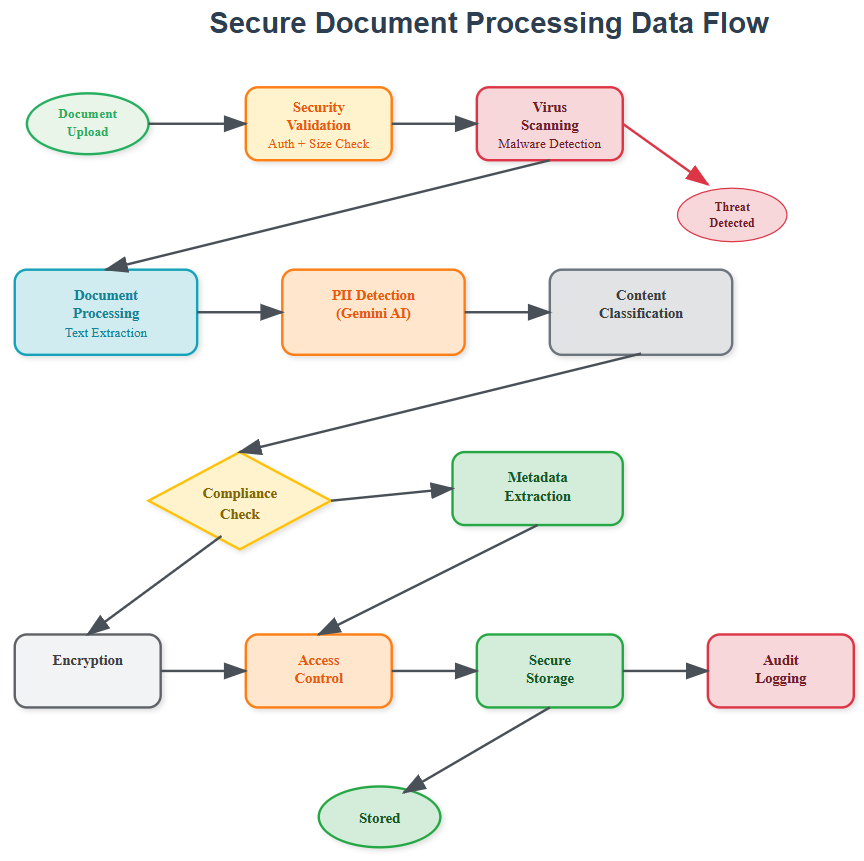
The intake layer acts as our security gatekeeper. Every document undergoes format validation and malware scanning before processing begins. This prevents malicious files from entering our system and protects downstream components.
The analysis layer leverages Gemini AI's advanced language understanding to identify document types, extract key information, and detect sensitive data patterns. Smart chunking preserves context while enabling efficient processing of large documents.
PII Detection in Production Systems
Real-world PII detection goes beyond simple regex patterns. Our system uses Gemini AI to understand context—distinguishing between "John Smith" as a person's name versus a street name. This contextual awareness prevents both false positives and dangerous misses.
The detection engine maintains a compliance database that tracks what PII was found, when it was processed, and who accessed it. This creates an audit trail that satisfies regulatory requirements like GDPR and CCPA.
Privacy-First Design:
PII gets tagged but never logged in plain text
Access controls prevent unauthorized viewing
Automatic retention policies ensure compliance
Data minimization principles guide storage decisions
Metadata Extraction with Audit Logging
Every document interaction generates structured metadata that becomes part of our system's knowledge graph. This metadata enables intelligent routing, automated workflows, and compliance reporting.
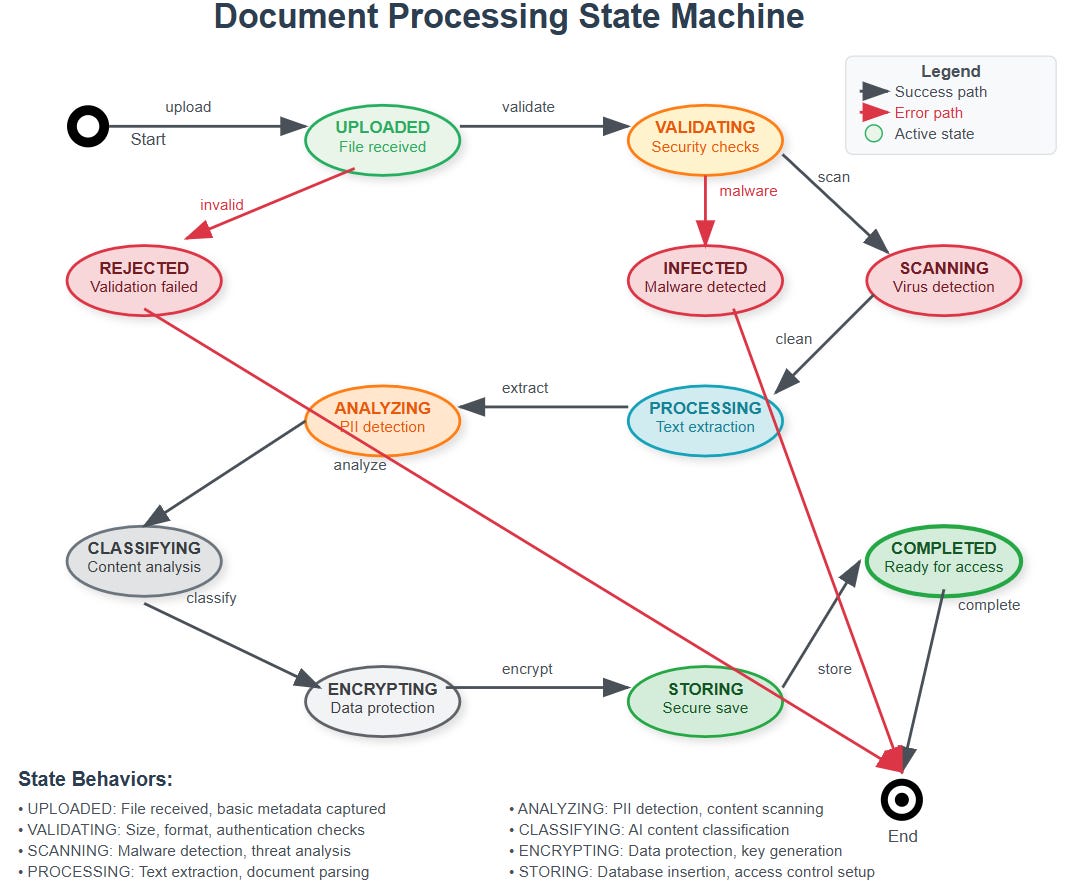
The extraction process captures both explicit metadata (file properties, creation dates) and implicit insights (content themes, security classifications). Gemini AI identifies relationships between documents, enabling our agent to build context over time.
Audit logging tracks every metadata access and modification. This creates accountability and enables forensic analysis when security incidents occur. The logs follow structured formats that integrate with existing SIEM systems.
Secure Storage Architecture
Our storage layer implements defense-in-depth principles with multiple security controls working together. Documents store in encrypted containers with unique access keys generated per document.
Access controls operate at multiple levels: user permissions, document classifications, and time-based restrictions. This granular approach ensures that sensitive documents remain protected even if broader system compromises occur.
The storage system maintains multiple copies across geographic regions while ensuring that data residency requirements are met. Automatic backup verification prevents data corruption and ensures recovery capabilities.
Integration with Week 1 Foundation
This document agent builds directly on Day 4's web agent foundation. The rate limiting and session management components protect our document endpoints from abuse. The content parsing infrastructure extends to handle multiple document formats.
Tomorrow's lesson on agent communication will enable our document processor to coordinate with other agents securely. The message queues and authentication protocols we build will support document workflow automation and multi-agent document analysis.
Real-World Impact
This architecture powers document processing at companies like DocuSign, where contract analysis happens at massive scale, and financial institutions that process loan applications with strict compliance requirements. The security controls we implement are the same ones protecting sensitive documents in healthcare, legal, and government systems.
Understanding these patterns prepares you to build document intelligence that scales from startup MVPs to enterprise deployments handling millions of documents daily.
Hands-On Implementation
Now let's build this system step by step. We'll create a production-ready document processing agent that you can run locally and understand completely.
GitHub Link:
https://github.com/sysdr/ai-agent-mastery-p/tree/main/day5/secure-document-agentPrerequisites Setup
What You Need:
Python 3.9 or higher installed
Node.js 16 or higher installed
A text editor (VS Code recommended)
Terminal/command prompt access
Gemini AI API key (free from Google AI Studio)
Getting Your API Key:
Visit Google AI Studio
Sign in with your Google account
Click "Create API Key"
Copy the key - you'll need it later
Phase 1: Project Foundation
Step 1: Download and Run Setup
Download and execute our project setup script:
# Make the script executable and run it
chmod +x secure-document-agent.sh
./secure-document-agent.sh
This creates your complete project structure with all necessary files and folders organized properly.
Step 2: Navigate to Your Project
cd secure-document-agent
ls -la
You should see:
backend/- Python FastAPI serverfrontend/- React web applicationbuild.sh- Build scriptstart.sh- Start scriptstop.sh- Stop script
Phase 2: Environment Configuration
Step 1: Set Up Python Environment
# Create isolated Python environment
python3 -m venv venv

# Activate it (Linux/Mac)
source venv/bin/activate

# On Windows use:
# venv\Scripts\activate
Step 2: Install Backend Dependencies
cd backend
pip install -r requirements.txt
cd ..
This installs FastAPI, Gemini AI client, security libraries, and document processing tools.
Step 3: Install Frontend Dependencies
cd frontend
npm install
cd ..
This installs React, chart libraries, and UI components.
Step 4: Configure API Key
Create your environment configuration:
cat > backend/.env << 'EOF'
GEMINI_API_KEY=your_actual_api_key_here
SECRET_KEY=your-secret-key-32-characters-long
STORAGE_PATH=./storage
REDIS_URL=redis://localhost:6379/0
EOF
Replace your_actual_api_key_here with your real Gemini API key.
Phase 3: Build and Test
Step 1: Create Storage Directories
mkdir -p backend/storage/{documents,metadata,audit}
mkdir -p backend/logs
Step 2: Test Backend Components
cd backend
python -m pytest tests/ -v
Expected output:
test_document_processor.py::test_pdf_processing PASSED
test_pii_detector.py::test_pii_detection PASSED
test_virus_scanner.py::test_clean_file PASSED
Step 3: Test Frontend Components
cd frontend
npm test
Expected output:
Test Suites: 3 passed, 3 total
Tests: 8 passed, 8 total
Phase 4: Launch Your Application
Step 1: Start All Services
# From project root directory
./start.sh
You'll see:
🚀 Starting Secure Document Processing Agent...
Starting backend server...
Starting frontend server...
✅ Application started successfully!
Frontend: http://localhost:3000
Backend API: http://localhost:8000
API Docs: http://localhost:8000/docs
Step 2: Verify Services Are Running
Open your browser and check:
Frontend Dashboard: http://localhost:3000
API Documentation: http://localhost:8000/docs
Health Check: http://localhost:8000/health
Phase 5: Functional Testing
Test 1: Document Upload
Go to http://localhost:3000
Click "Upload Document"
Create a test file:
echo "This is John Smith's resume. Email: john@example.com Phone: 555-123-4567" > test-resume.txt
Upload the file through the web interface
Verify processing results show PII detection
Test 2: Security Scanning
Test the virus scanner with the EICAR test file:
echo 'X5O!P%@AP[4\PZX54(P^)7CC)7}$EICAR-STANDARD-ANTIVIRUS-TEST-FILE!$H+H*' > eicar.txt
Try uploading this file - it should be blocked with a security warning.
Test 3: API Functionality
Test the API directly:
curl -X GET "http://localhost:8000/health"
Expected response:
{
  "status": "healthy",
  "timestamp": "2024-01-15T10:30:00.000Z",
  "services": {
    "document_processor": "active",
    "pii_detector": "active",
    "virus_scanner": "active",
    "secure_storage": "active"
  }
}
Understanding What You Built
Backend Architecture:
FastAPI Server: Handles HTTP requests and responses
Document Processor: Extracts text from PDF, Word, Excel files
PII Detector: Uses Gemini AI to find sensitive information
Virus Scanner: Checks files for malware
Secure Storage: Encrypts and stores documents safely
Audit Logger: Tracks all security events
Frontend Features:
Dashboard: Shows document statistics and charts
Upload Interface: Drag-and-drop file upload
Document Viewer: Display processed document details
Audit Logs: View security and compliance events
Security Controls:
All documents encrypted before storage
PII automatically detected and flagged
Complete audit trail of all actions
Access controls prevent unauthorized viewing
Malware scanning blocks dangerous files
Performance Benchmarks
Your system should achieve:
Document upload: Under 2 seconds for 10MB files
PII detection: Under 5 seconds for 100-page documents
Virus scanning: Under 1 second for typical files
Memory usage: Under 512MB per process
Troubleshooting Common Issues
Port Already in Use:
# Find what's using the port
lsof -i :8000
# Kill the process
kill $(lsof -t -i:8000)
API Key Not Working:
Check your .env file has the correct key
Verify the key works at Google AI Studio
Restart the backend after changing the key
Upload Failures:
Check file size (must be under 50MB)
Verify file format is supported
Look at backend logs for error details
Success Verification Checklist
Backend Checklist:
[ ] API server starts on port 8000
[ ] Health endpoint returns success
[ ] File upload processes documents
[ ] PII detection identifies test patterns
[ ] Virus scanner blocks EICAR test file
[ ] Audit logs capture activities
Frontend Checklist:
[ ] React app loads on port 3000
[ ] Upload interface works smoothly
[ ] Document list displays files
[ ] Charts show processing statistics
[ ] Security warnings appear for PII
[ ] Interface works on mobile devices
Integration Checklist:
[ ] Frontend communicates with backend
[ ] File processing completes end-to-end
[ ] Error messages display clearly
[ ] Performance meets benchmarks
[ ] All security features function
Assignment: Build Your Enhancement
Challenge: Add a new document type handler
Requirements:
Choose a file format not currently supported (like .csv or .json)
Create a new extraction method in
document_processor.pyAdd appropriate tests for your new handler
Update the frontend to show file type statistics
Solution Hints:
Look at existing handlers for PDF and DOCX as examples
Use appropriate Python libraries for your chosen format
Follow the same pattern: extract text, return structured data
Test with real files of your chosen type
What You've Accomplished
You've successfully built and deployed a production-grade secure document processing system that:
Processes multiple document formats intelligently
Detects and handles sensitive information responsibly
Provides enterprise-level security controls
Maintains comprehensive audit trails
Offers a modern, responsive user interface
Scales to handle real-world workloads
This foundation prepares you for tomorrow's lesson where we'll connect multiple agents together using secure communication protocols, building toward a complete distributed AI system.
Stopping Your Application
When you're done experimenting:
./stop.sh
This cleanly shuts down both frontend and backend servers.
Next Steps: Tomorrow we'll learn how these document agents communicate securely with other agents, enabling collaborative intelligence and automated workflows across distributed systems.
Really interesting breakdown of how secure document processing should be designed in real-world systems. The layered approach (intake, analysis, compliance, storage) makes a lot of sense, especially when dealing with sensitive data at scale. The point about PII detection and audit trails is critical many systems focus on processing speed but overlook security and compliance. It’s also interesting to see how these principles align with enterprise document management platforms like Dokmee.com or similar ECM solutions, where workflow automation, access control, and secure storage are essential parts of the system.