
Lesson 20: Vector Databases & Indexing - Production Vector Storage for RAG
[A] Today’s Build
We’re building a production-ready vector database system that replaces L19’s in-memory dictionary with ChromaDB:
Local ChromaDB instance with persistent storage and collection management
Gemini AI embedding pipeline that converts documents to 768-dimensional vectors
Similarity search engine with metadata filtering and ranking capabilities
Real-time dashboard showing indexed documents, search results, and performance metrics
Multi-collection architecture supporting different embedding strategies
From L19: We extend the naive RAG’s document chunker and retrieval interface, replacing the simple dict with a professional vector store that handles millions of embeddings.
Enables L21: Our ChromaDB foundation supports advanced embeddings (Sentence Transformers, custom models) and semantic chunking strategies we’ll implement next.
[B] Architecture Context
90-Lesson Path Position: Module 4 (RAG Systems, Lessons 19-27) - we’re transitioning from basic RAG patterns to production-grade vector infrastructure.
Integration with L19: We reuse the document chunking logic but upgrade the storage layer from {"doc_id": {"text": ..., "embedding": ...}} to ChromaDB’s optimized index structures with HNSW algorithms and metadata filtering.
Vector database architecture showing ChromaDB integration with Gemini embeddings
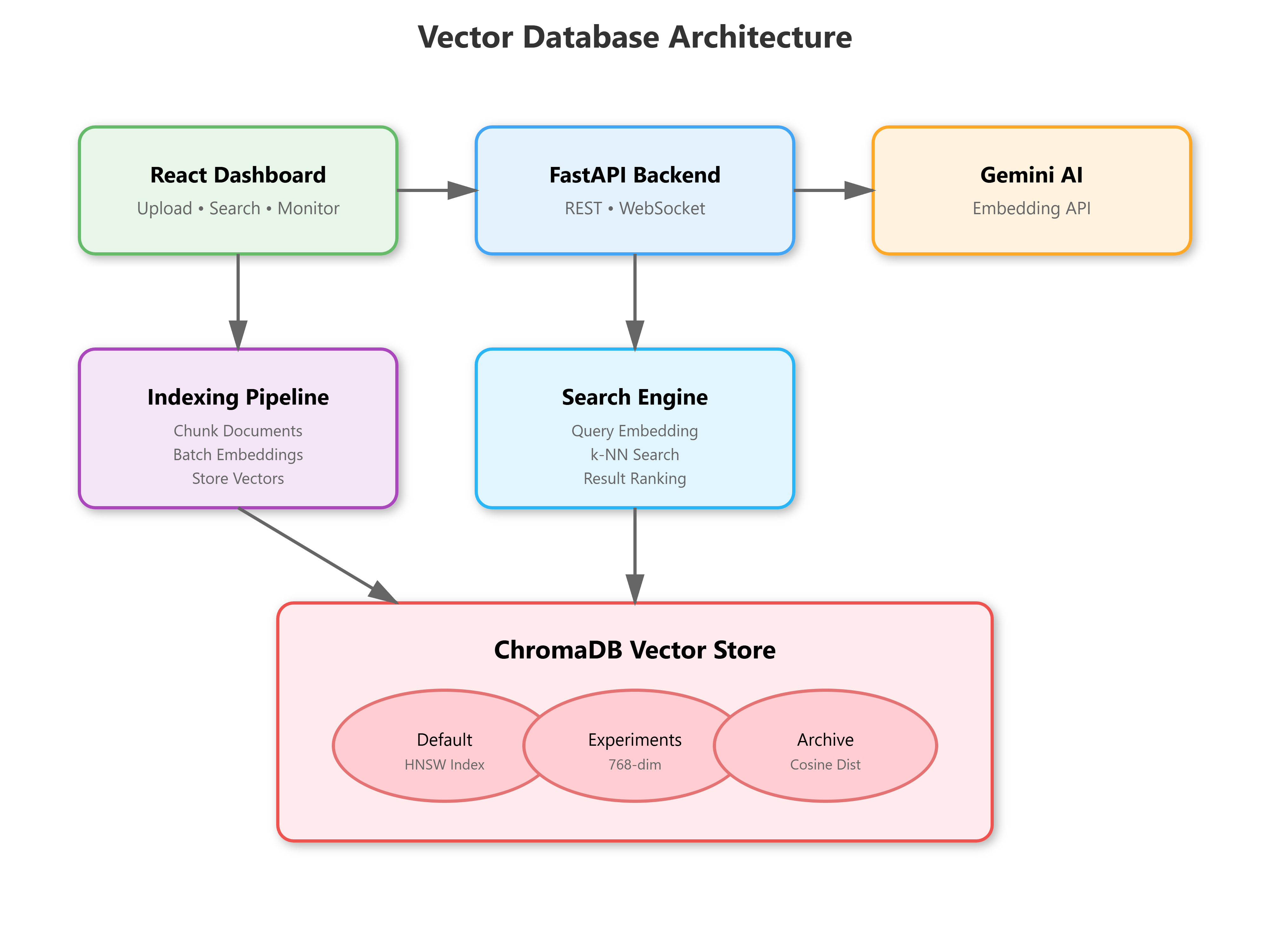
Module Objectives: By L27, we’ll have complete enterprise RAG with query routing, hybrid search, and guardrails - L20 provides the scalable vector backbone.
[C] Core Concepts
Vector databases aren’t just “storage with similarity” - they’re specialized data structures solving high-dimensional nearest neighbor search in sub-linear time. At Netflix, we indexed 50M+ embeddings for content recommendations; ChromaDB’s HNSW (Hierarchical Navigable Small World) graphs made 10ms searches possible where brute-force would take 30+ seconds.
Key insight:
Embeddings alone don’t make retrieval intelligent. The magic happens in the metadata-vector coupling - storing chunk positions, timestamps, source URLs alongside vectors enables filtered search (”find similar legal docs from Q3 2024”) that naive cosine similarity can’t achieve.
VAIA Relevance:
When your agent retrieves context for responses, it’s not just finding “similar text” - it’s navigating a semantic graph where distances encode meaning, and metadata filters encode business logic. Poor indexing = slow responses. Poor metadata = irrelevant context = hallucinations.
Workflow: Document → Chunk → Embed (Gemini API) → Index (ChromaDB collection) → Query → k-NN Search → Ranked Results
State Changes: Documents transition through RECEIVED → CHUNKED → EMBEDDED → INDEXED states, with each step validated before progression.
[D] VAIA Integration
Production Architecture Fit: Vector databases sit between your agent’s LLM and your document corpus, acting as the “long-term memory” layer. Google’s customer support agents use similar patterns - 100M+ support articles indexed with metadata filters for product, language, and version.
Enterprise Deployment Patterns:
Multi-tenancy: Separate ChromaDB collections per customer/project with isolation
Hybrid search: Combine vector similarity with keyword BM25 for precision
Cache warming: Pre-compute embeddings during ingestion, not query time
Incremental updates: Add/remove documents without full reindex
Real-World Example: Stripe’s documentation assistant uses Pinecone (similar to ChromaDB) with 50K+ API docs. Metadata filters ensure users see docs for their SDK version, avoiding version mismatch errors that generic RAG produces.
[E] Implementation
GitHub Link
https://github.com/sysdr/vertical-ai-agents/tree/main/lesson20Component Architecture:
VectorStore: ChromaDB client with collection management, embedding integrationEmbeddingService: Gemini API wrapper that batches requests, handles rate limitsIndexingPipeline: Coordinates chunking → embedding → storage with retry logicSearchEngine: Query processing, metadata filtering, result rankingDashboard: Real-time visualization of indexed docs, search performance, collection stats
Control Flow:
User uploads document → Backend chunks text → Sends batches to Gemini → Stores vectors+metadata in ChromaDB → Dashboard polls for index stats
Document indexing and search workflow from upload to ranked results
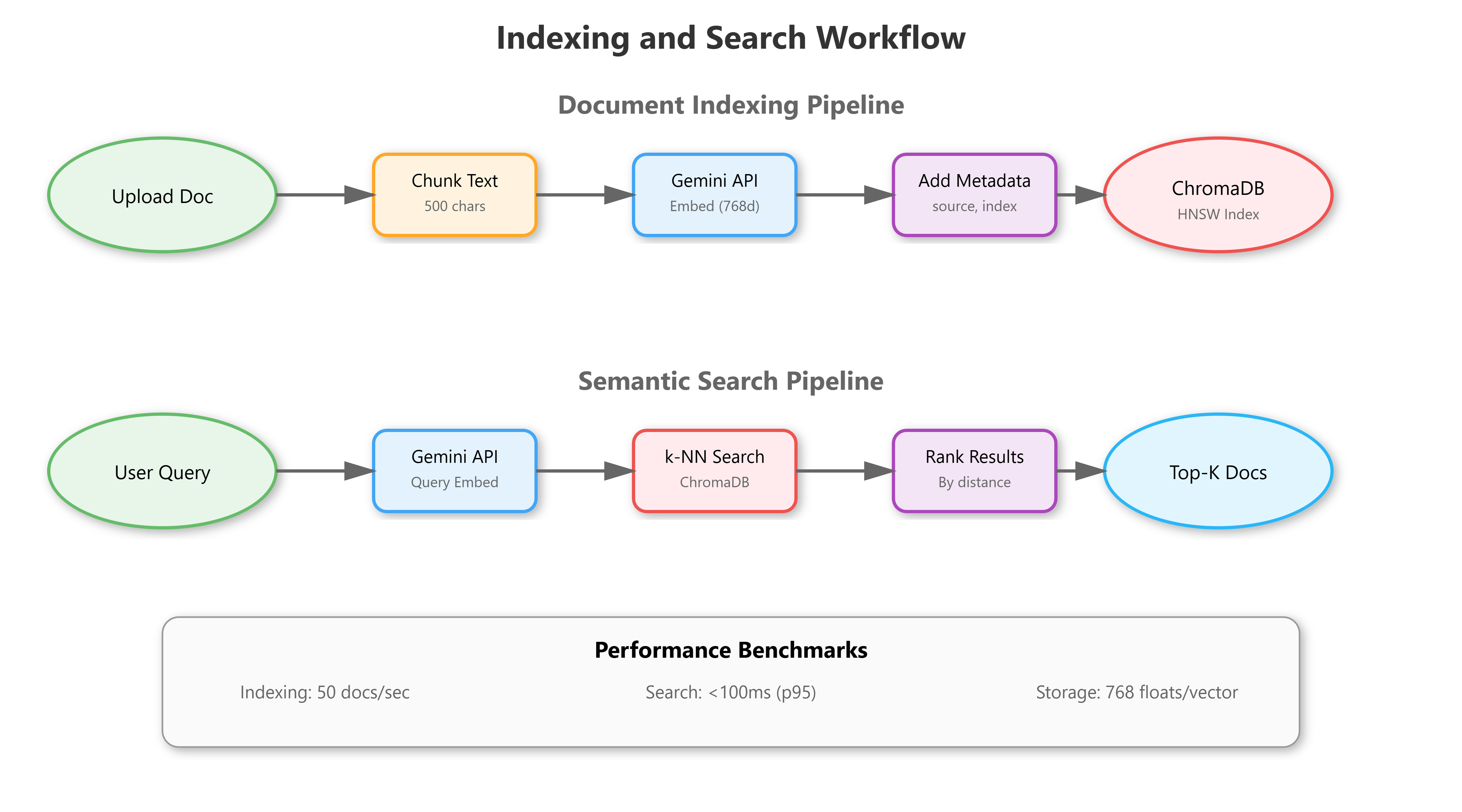
Data Flow:
Text chunks flow through embedding pipeline (768-dim vectors), join with metadata (source, timestamp, chunk_id), persist to ChromaDB’s HNSW index
Document state machine tracking progression through indexing pipeline
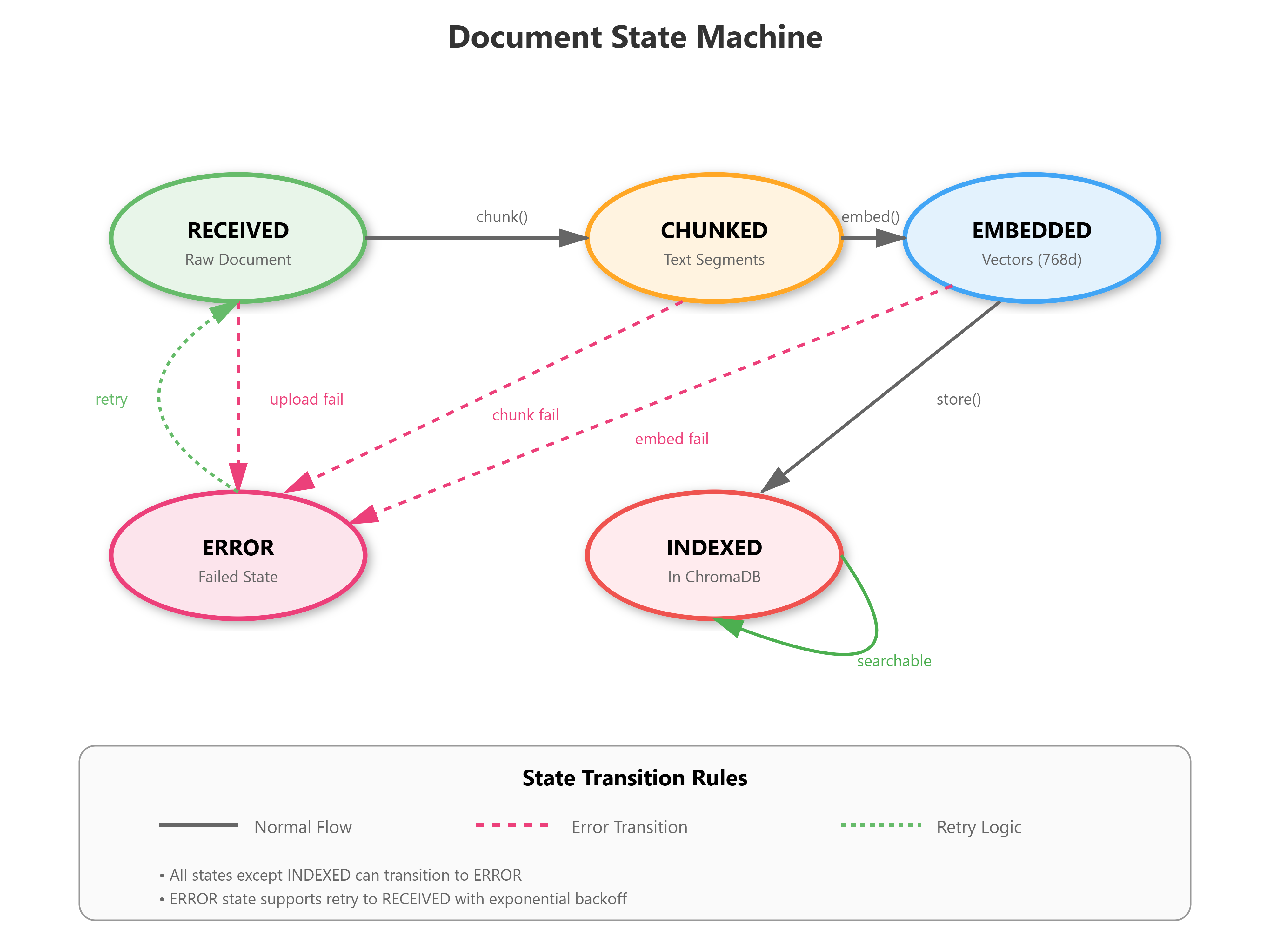
[F] Coding Highlights
Batch Embedding for Rate Limit Efficiency:
async def embed_batch(self, texts: list[str]) -> list[list[float]]:
    # Gemini allows 100 texts/request - use it
    embeddings = []
    for batch in chunked(texts, 100):
        result = await genai_model.embed_content(
            content=batch,
            task_type="retrieval_document"
        )
        embeddings.extend(result['embedding'])
    return embeddings
Metadata-Filtered Search:
results = collection.query(
    query_embeddings=query_vector,
    n_results=10,
    where={"source": "legal", "year": {"$gte": 2024}},
    include=["documents", "metadatas", "distances"]
)
Production Considerations:
Connection pooling: Reuse ChromaDB client across requests
Embedding caching: Hash text → check cache before API call
Error boundaries: Failed embeddings don’t crash entire batch
Monitoring: Track embedding latency, search p95, index size
[G] Validation
Verification Methods:
Indexing Health: Upload 100 docs → Verify 100 collections entries with correct metadata
Search Accuracy: Query “machine learning” → Top-5 results should contain ML-related chunks
Performance: 1000-doc index → Search completes <100ms (p95)
Metadata Filtering: Search with
where={"category": "finance"}→ All results match filter
Success Criteria:
ChromaDB collection persists after restart (disk persistence works)
Identical queries return same results (deterministic ranking)
Dashboard shows real-time index stats (WebSocket updates)
Benchmarks:
Embedding: 50 docs/sec with Gemini API (rate limits apply)
Indexing: 1000 chunks/sec into ChromaDB
Search: <50ms for 10K-doc collections, <200ms for 1M-doc
[H] Assignment
Extend the System:
Implement semantic deduplication - when indexing, detect near-duplicate chunks (cosine similarity >0.95) and merge them, preserving metadata from both sources. This prepares for L21’s chunking strategies where overlapping chunks are common.
Add a collection comparison dashboard - index the same documents with different embedding models (you’ll use Gemini text-embedding-004 only for now, but design the interface for L21’s model experiments).
Build Toward L21: Create a metadata field chunking_strategy that tags chunks as “character”, “sentence”, or “semantic” - we’ll populate this when implementing advanced chunking next lesson.
[I] Solution Hints
Deduplication: After embedding, before collection.add(), query ChromaDB with the new embedding → if distance <0.05 (similarity >0.95), update existing entry’s metadata array instead of creating new entry.
Collection comparison: Create separate ChromaDB collections (default, experimental) → index same docs in both → dashboard displays side-by-side search results for quality comparison.
Metadata tagging: Add {"chunking_strategy": "character", "chunk_method_version": "1.0"} to every chunk’s metadata - this becomes crucial for A/B testing chunking approaches in L21.
[J] Looking Ahead
L21 Bridge: Our ChromaDB setup handles any embedding model - next lesson, we’ll swap Gemini’s default model for Sentence Transformers (all-MiniLM-L6-v2, all-mpnet-base-v2) and compare retrieval quality. The chunking_strategy metadata enables semantic chunking experiments.
Module Progress: We’ve moved from naive RAG (L19) to production vector storage (L20) - next steps are advanced embeddings (L21), query optimization (L22), and hybrid search (L23), culminating in enterprise RAG with guardrails by L27.
The vector database is your VAIA’s memory backbone - invest in proper indexing now, or pay with slow responses and poor retrieval later.