
Lesson 1: Python Setup for AI - Enterprise Development Environment
Introduction
[A] Today’s Build
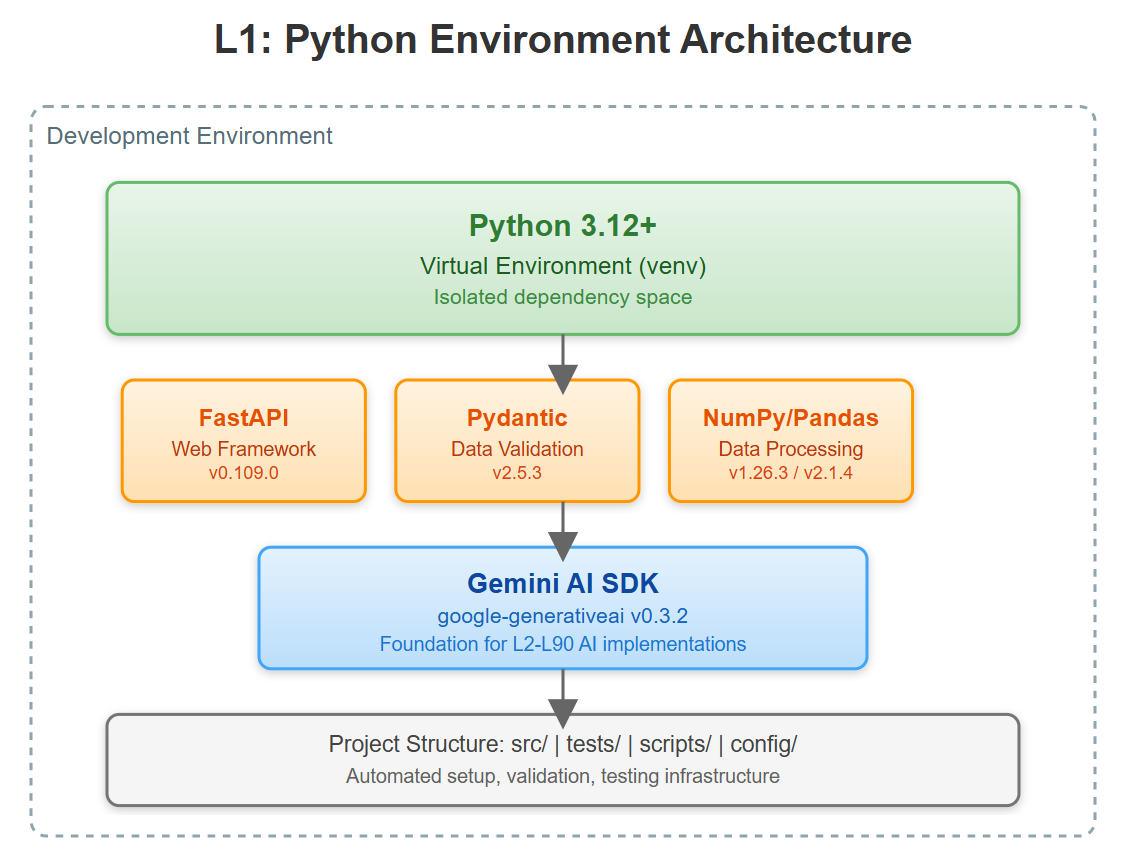
In this foundational lesson, we establish the production-grade Python environment that will support our entire 90-lesson VAIA journey:
Isolated Python 3.12 environment with venv for dependency isolation
Pinned dependency management using requirements.txt with version locking
Enterprise project structure with proper separation of concerns
Automated setup workflow with validation and health checks
Essential AI/ML stack: FastAPI, Pydantic V2, NumPy, Pandas, google-generativeai
Since this is Lesson 1, we’re building from scratch. This environment becomes the foundation for every subsequent lesson, where we’ll add FastAPI services (L2), AI orchestration (L3+), and eventually full distributed VAIA systems.
[B] Architecture Context
Position in 90-Lesson Path: We’re at the start of Module 1 (Foundations). This lesson establishes the development baseline that every subsequent module depends on. By L30, we’ll have built multi-agent systems handling millions of requests—but it all starts with a correctly configured Python environment.
Integration Strategy:
Module 1 (L1-L10): We’re laying groundwork
Module 2 (L11-L20): Will add LLMOps tooling to this base
Module 3 (L21-L30): Will containerize and orchestrate these environments
Objectives Alignment: Enterprise VAIA systems require reproducible, isolated environments. We’re not just installing Python—we’re establishing patterns for dependency management, version control, and environment consistency that scale to production deployments.
[C] Core Concepts
Virtual Environment Isolation
Python’s venv creates an isolated dependency space, preventing conflicts between projects. For VAIA systems running multiple agents with different library versions, this isolation is critical. Think of each venv as a Docker container for Python—complete dependency independence without the container overhead.
Key Insight: Enterprise AI systems often require pinned library versions for reproducibility. A model trained with numpy==1.26.0 may produce different results with numpy==1.26.1 due to subtle numerical differences. Version pinning isn’t pedantic—it’s production survival.
Dependency Management Philosophy
We use a layered approach:
Base dependencies (requirements.txt): Core libraries with exact versions
Dev dependencies (requirements-dev.txt): Testing, linting tools
Lock files (future lessons): For absolute reproducibility
VAIA System Design Relevance: When deploying multiple VAIA agents across a cluster, each must have identical dependencies. A version mismatch in Pydantic can cause schema validation failures that cascade through the system. Our setup enforces this consistency from day one.
Workflow Patterns
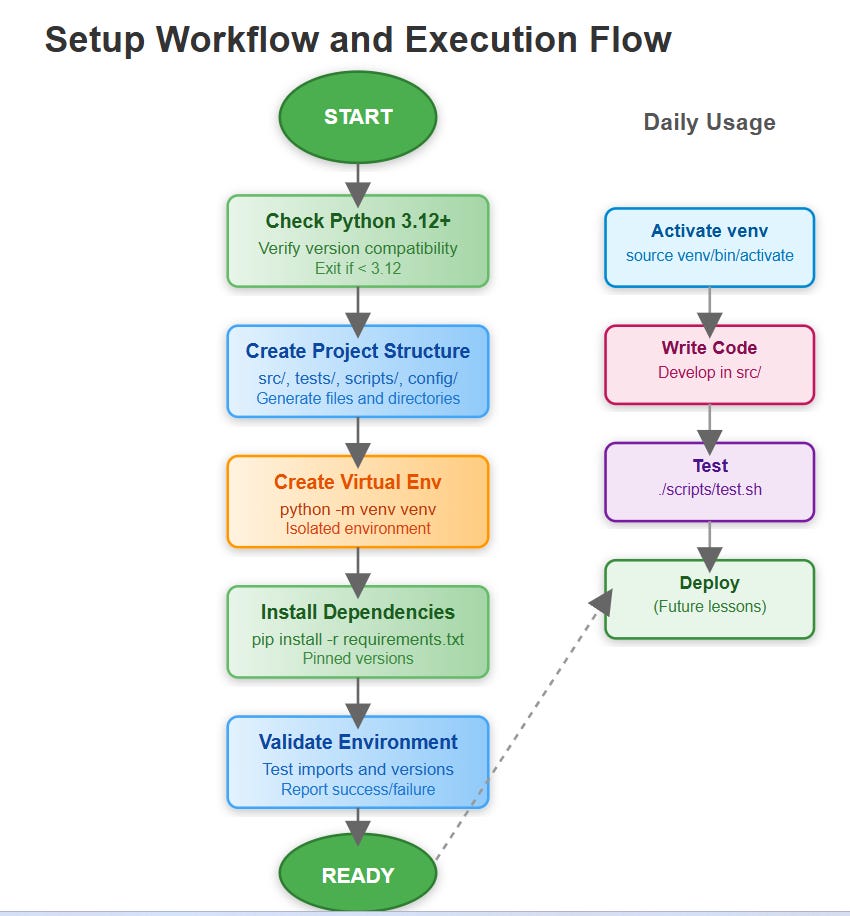
The development cycle we establish:
setup → develop → test → validate → deploy
Each stage has automated checks. If dependencies fail to install, we catch it in setup—not in production at 3 AM.
[D] VAIA Integration
Production Architecture Fit:
In enterprise VAIA deployments, the development environment mirrors production. We use the same Python version (3.12), same library versions, same directory structure. This parity eliminates “works on my machine” issues.
Enterprise Deployment Patterns:
Real-world example: At scale, companies like Stripe run thousands of Python microservices. Each service has a requirements.txt with 50-200 dependencies. When a critical security patch drops for a library, they need to update exactly one service without breaking others. Virtual environments make this surgical precision possible.
Production Scenario: Your VAIA system processes insurance claims using Gemini AI. The claims processor uses FastAPI 0.104.1 with specific middleware. The fraud detection agent uses FastAPI 0.105.0 with different middleware. Both run on the same server. Without venv isolation, they’d conflict. With proper environments, they coexist seamlessly.
[E] Implementation
GitHub Link:
https://github.com/sysdr/vertical-ai-agents/tree/main/lesson1
Component Architecture
Our setup creates a modular structure:
vaia-project/
├── venv/              # Isolated Python environment
├── src/               # Source code (future lessons)
│   ├── agents/        # AI agent implementations
│   ├── services/      # API services
│   └── utils/         # Shared utilities
├── tests/             # Test suite
├── scripts/           # Automation scripts
├── requirements.txt   # Pinned dependencies
└── config/            # Configuration files
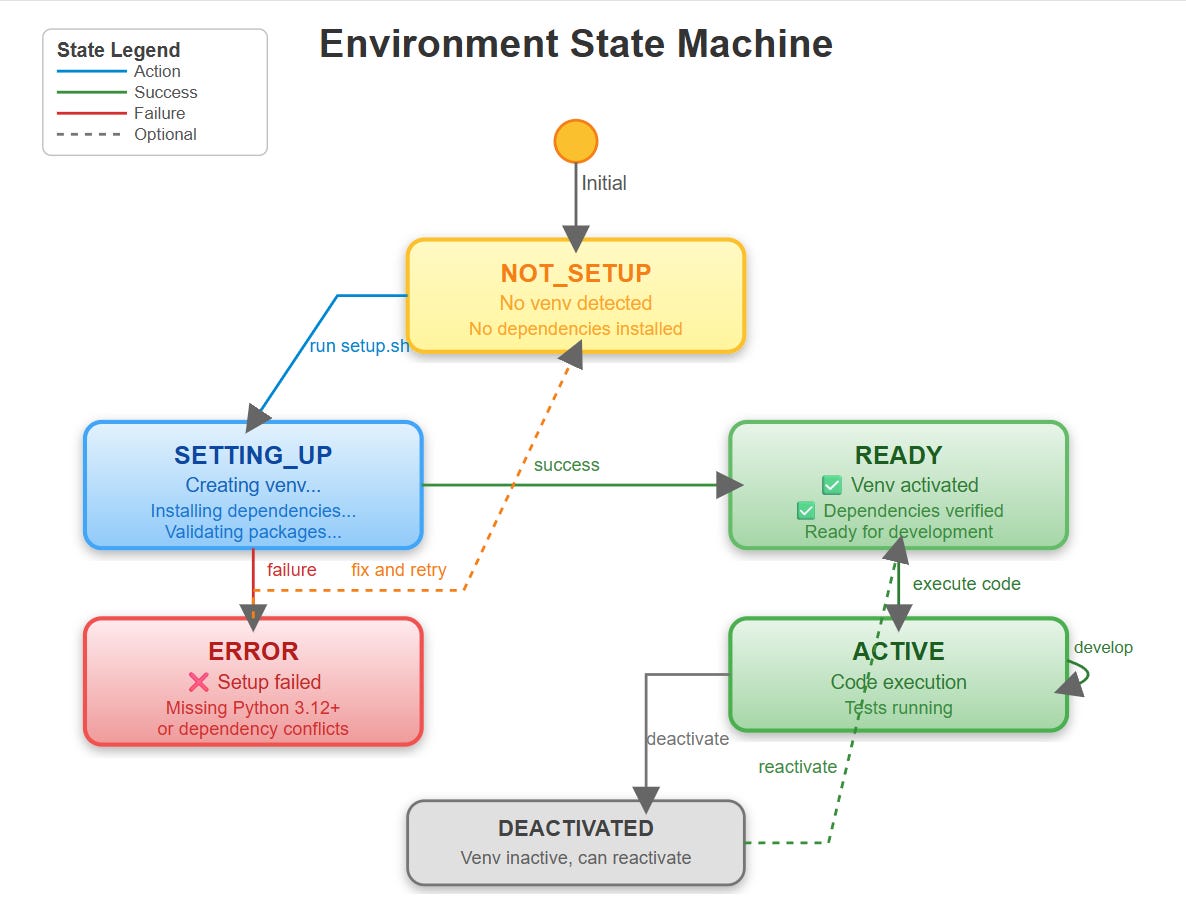
Control Flow:
setup.sh detects Python 3.12
Creates venv in project root
Activates environment
Installs dependencies with pip (pinned versions)
Validates installation
Outputs success confirmation
Data Flow: Dependencies flow from requirements.txt → pip → venv/lib → your code. Each layer adds validation (checksums, version checks).
[F] Coding Highlights
Virtual Environment Creation
# The venv module creates isolated environments
python3.12 -m venv venv

# Activation differs by OS
source venv/bin/activate  # Linux/Mac
venv\Scripts\activate     # Windows
Production Consideration: Always specify Python version explicitly. python might be Python 2.7 on legacy systems. python3.12 is unambiguous.
Dependency Pinning
# requirements.txt - WRONG
fastapi

# requirements.txt - RIGHT
fastapi==0.109.0
pydantic==2.5.3
Why It Matters: Unpinned dependencies install the latest version at build time. Your code works today with FastAPI 0.109.0, breaks tomorrow when 0.110.0 auto-installs with breaking changes.
Installation Validation
import sys
import importlib

def validate_environment():
    required = [’fastapi’, ‘pydantic’, ‘numpy’, ‘pandas’]
    for pkg in required:
        try:
            importlib.import_module(pkg)
        except ImportError:
            print(f”❌ Missing: {pkg}”)
            sys.exit(1)
    print(”✅ Environment validated”)
This catches issues immediately rather than failing when code executes.
[G] Validation
Verification Methods
Environment Check:
which pythonshould point to venv/bin/pythonDependency Verification:
pip listshows exact versionsImport Test: All libraries import without errors
Version Validation: Python reports 3.12.x
Success Criteria
✅ Virtual environment activated
✅ All dependencies installed with correct versions
✅ No import errors for core libraries
✅ scripts/ directory contains working automation
Benchmarks
Installation should complete in <60 seconds on modern hardware. If it takes >5 minutes, check internet connectivity or pip cache.
[H] Assignment
Extend the Setup:
Add requirements-dev.txt with testing tools:
pytest==7.4.3
pytest-cov==4.1.0
black==23.12.1
ruff==0.1.9
Create setup-dev.sh that:
Installs both requirements.txt and requirements-dev.txt
Configures pre-commit hooks
Sets up pytest.ini configuration
Build a validation script (validate.py) that:
Checks Python version ≥ 3.12
Verifies all dependencies present
Runs a simple FastAPI hello-world test
Reports success/failure with colored output
This prepares you for L2 where we’ll build actual FastAPI services requiring proper dev tooling.
[I] Solution Hints
For requirements-dev.txt, group dependencies logically:
# Testing
pytest==7.4.3
pytest-cov==4.1.0

# Linting
black==23.12.1
ruff==0.1.9
For validation.py, use the importlib and sys.version_info approaches shown in [F]. Add color with simple ANSI codes: \033[92m✅\033[0m for green checkmarks.
For FastAPI test, a minimal app:
from fastapi import FastAPI
app = FastAPI()

@app.get(”/health”)
def health():
    return {”status”: “ok”}
Use pytest with FastAPI’s TestClient to verify it responds correctly.
[J] Looking Ahead
L2: FastAPI Fundamentals for AI Services
With our Python environment ready, L2 builds your first AI service: a FastAPI application that accepts requests, calls Gemini AI, and returns responses. We’ll use the exact dependencies installed today, showing why version pinning matters when integrating external APIs.
Module Progress: By completing L1, you’ve established 10% of Module 1’s foundation. L2-L4 build services on this base. L5-L7 add database layers. L8-L10 introduce monitoring and observability—all depending on this correctly configured environment.
The environment you built today will run every line of code in the next 89 lessons. Treat it with care.
What is VAIA here? I tried to get the full form but not able to.