
Introduction
Welcome to one of the most exciting projects you’ll build in this course. Today, you’re going to create a real conversational AI agent - not a simple chatbot, but a production-quality system that remembers conversations, tracks goals, and maintains state across multiple sessions. Think of it like building your own mini version of ChatGPT’s backend infrastructure.
By the end of this lesson, you’ll have a working system that processes conversations, stores them in a database, and displays everything through a professional dashboard. More importantly, you’ll understand the architecture behind every major AI assistant platform in the industry today.
What You’re Building Today
In this project, you’ll create three interconnected pieces:
A Conversational Engine that processes messages, maintains conversation context, and generates intelligent responses using Google’s Gemini AI. This is the brain of your system.
A Persistent Memory System using SQLite that saves every conversation, allowing users to pick up exactly where they left off - even days later. Professional AI systems need this capability.
A Real-Time Dashboard built with React that shows live conversation metrics, active goals, and message history. This gives you visibility into what your AI is actually doing.
You’re also building something unique:
A goal-tracking system that helps your AI stay focused on user objectives. If someone asks your agent to help them plan a trip, your system will remember that goal and work toward completing it.
Where This Fits in Your Learning Path
You’ve spent the last fourteen lessons building up to this moment. You learned about transformers, embeddings, context windows, and state management. Now you’re combining all of those concepts into one working system.
This project directly uses the state management patterns from Lesson 14. Remember those Pydantic models and JSON serialization techniques? They’re the foundation of how your conversational agent saves and restores state.
After you complete this lesson, you’ll move into Module 2 where you’ll add external capabilities to your agent - things like web search, database queries, and API integrations. The conversation loop you build today becomes the orchestrator for all those future capabilities.
Core Concepts You Need to Understand
Persistent Conversational Memory
Regular chatbots forget everything after each conversation. Your agent is different - it maintains a three-tier memory architecture:
Short-term memory keeps the current conversation in RAM while you’re actively chatting. This is fast and efficient for real-time responses.
Medium-term memory stores conversation history in a SQLite database. When you restart the application, all your previous conversations load right back up.
Long-term memory would track user preferences and patterns across many conversations. You’ll build this in future lessons, but the foundation is here.
This architecture mirrors how companies like Anthropic and OpenAI handle conversation continuity. They need to serve millions of users while maintaining context, so they use similar tiered storage systems.
Goal-Seeking Behavior
Here’s what makes your agent special:
It doesn’t just respond to messages, it actively works toward objectives. When a user sets a goal like “help me understand neural networks,” your agent tracks that goal through the conversation.
After each exchange, your system asks the Gemini AI:
“Has this goal been achieved?”
If yes, the goal gets marked complete. If not, the agent adjusts its responses to keep working toward completion.
This pattern appears in every production AI assistant. Customer service bots track issue resolution. Sales assistants track purchase completion. Your implementation is simplified, but the core concept is identical.
State Transitions and Flow Control
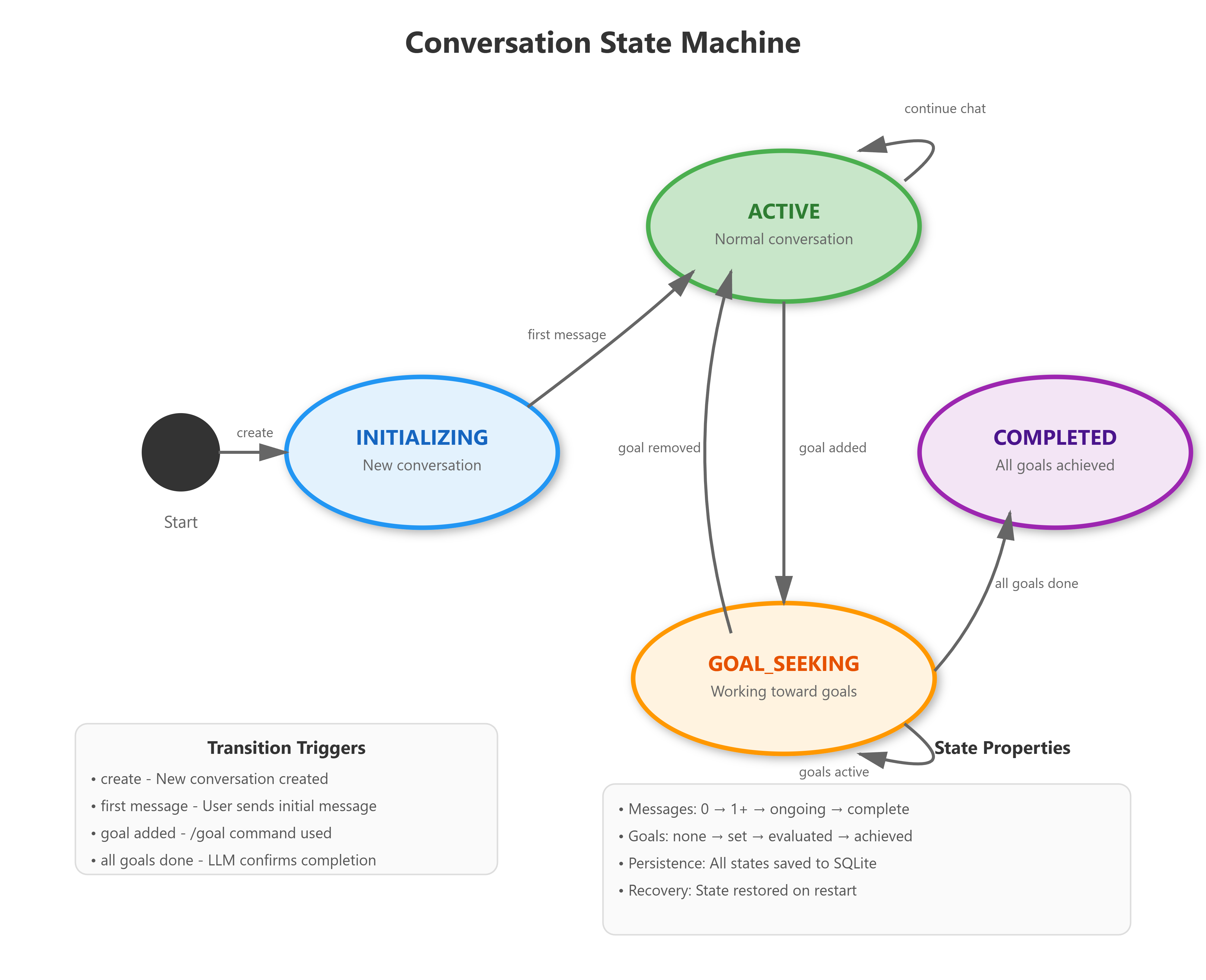
Every conversation moves through a predictable lifecycle. Your agent starts in an INITIALIZING state when created. It moves to ACTIVE after the first message. When someone sets a goal, it shifts to GOAL_SEEKING. Once all goals complete, it reaches COMPLETED.
Understanding state machines is crucial for building reliable systems. Your conversation engine knows exactly what state it’s in at every moment, which determines how it behaves. This predictability makes debugging easier and prevents unexpected behavior.
How This Works in Production
Companies running AI systems at scale use this exact architecture with more powerful infrastructure. Let me show you how your simple project maps to real-world deployment.
Production Architecture Patterns
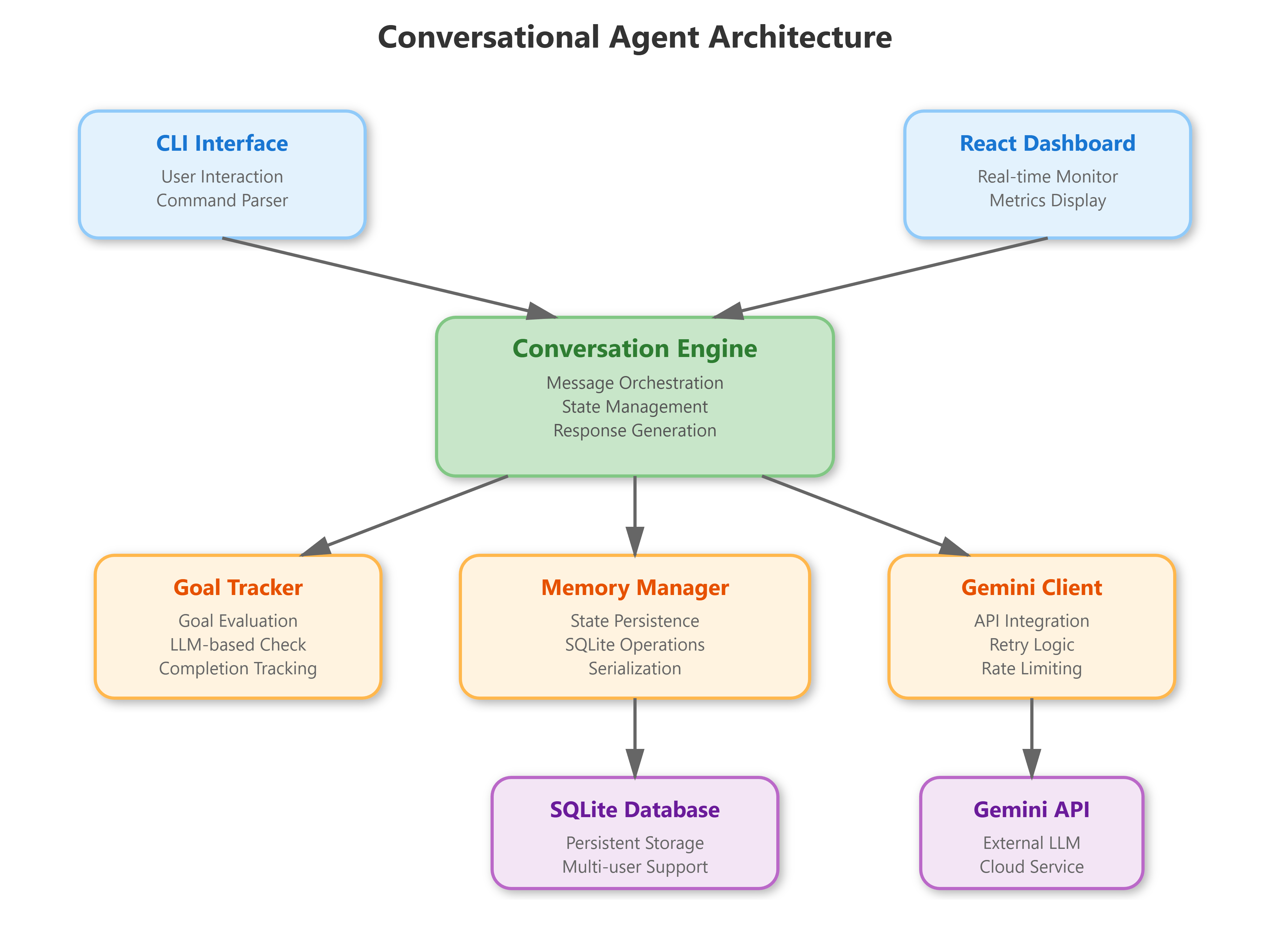
Separation of Concerns: Your conversation logic lives separately from state persistence and AI integration. In production, these would be separate microservices. Your single Python application demonstrates the pattern even if everything runs in one process.
Graceful Degradation:
Notice how your Gemini client has retry logic with exponential backoff? If the AI service goes down temporarily, your system waits and retries rather than crashing. Production systems need this resilience.
Audit Trails:
Every message gets timestamped and logged. Your database stores the complete conversation history. In regulated industries (healthcare, finance), this audit capability is legally required.
Cost Tracking:
Your system counts tokens used in each conversation. When you scale to thousands of users, AI API costs become significant. You need to monitor usage and set budgets.
Real-World Examples
Stripe’s billing support agent uses this architecture. When customers ask billing questions, the agent maintains conversation state, tracks the resolution goal, and stores everything in their database for later analysis.
Intercom’s customer messaging platform follows similar patterns. Their agents remember customer context across multiple conversations, track support ticket status, and provide analytics dashboards.
Your implementation is simplified - you’re using SQLite instead of PostgreSQL, running on one machine instead of Kubernetes clusters, and handling one request at a time instead of thousands per second. But the fundamental architecture is the same.
Understanding the Components
Let me walk you through each piece of your system and explain what it does.
The Conversation Engine
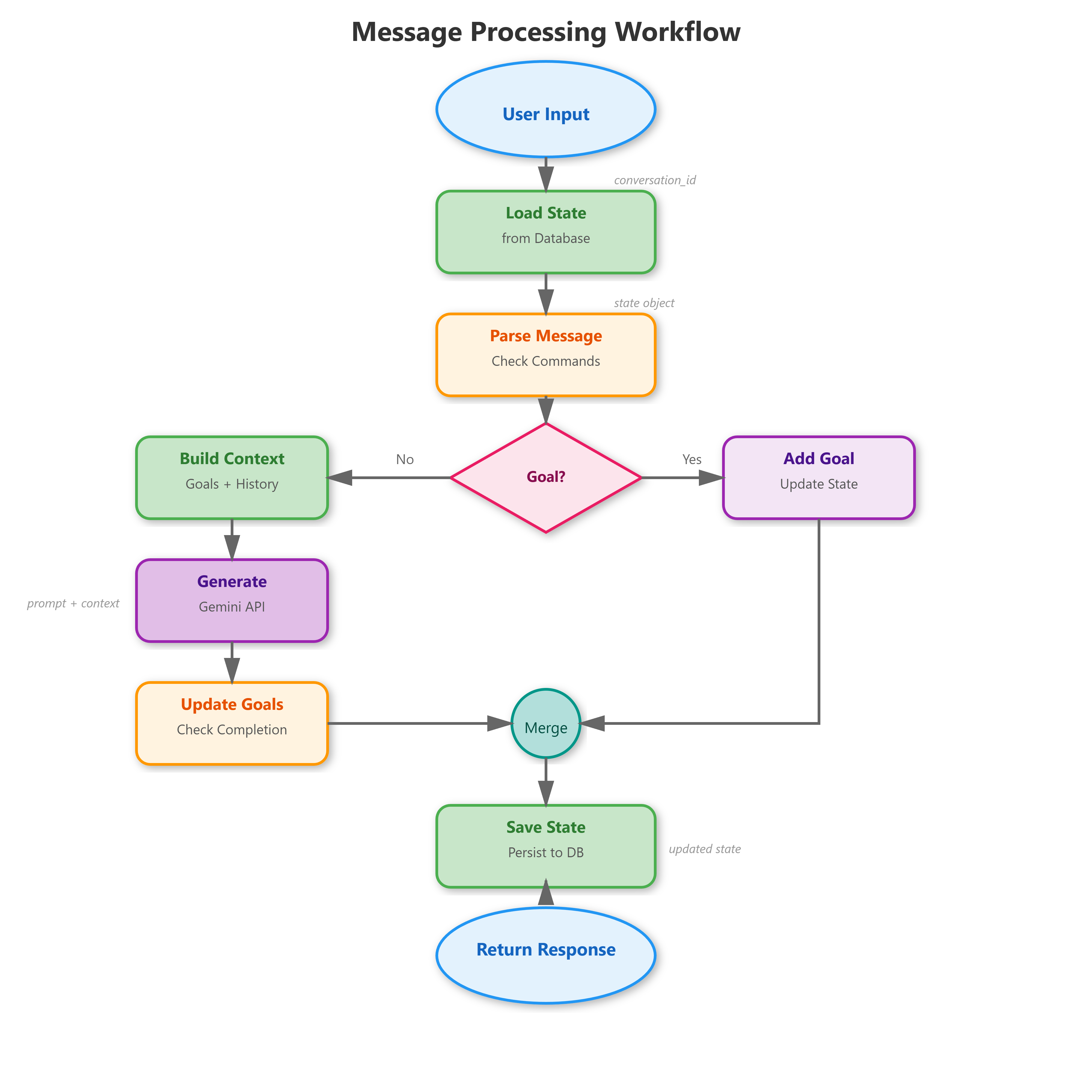
Think of this as the conductor of an orchestra. When a message arrives, the engine:
Loads the conversation state from the database
Checks if the message is a special command (like setting a goal)
Builds context by combining message history with active goals
Calls the Gemini AI to generate a response
Evaluates whether any goals were completed
Saves the updated state back to the database
Here’s a simplified version of what that orchestration looks like in code:
python
async def process_message(self, conversation_id, user_message):
    # Load previous state
    state = await self.memory.load_state(conversation_id)

    # Add new message to history
    state.add_message("user", user_message)

    # Build context with goals
    context = self.goal_tracker.get_active_goals_context(state)

    # Generate response
    response, tokens = await self.llm.generate_response(state.messages, context)
    state.add_message("assistant", response, tokens)

    # Check goal completion
    await self.goal_tracker.update_goals(state)

    # Save everything
    await self.memory.save_state(state)

    return response
This pattern - load, process, save - appears everywhere in software engineering. Web applications do this with user sessions. Video games do this with player progress. Your conversational agent follows the same principle.
The Memory Manager
Your database stores conversations in a simple but effective schema. Each conversation has a unique ID, belongs to a specific user, and contains a JSON blob with all the state data.
When you call save_state(), your system serializes the entire conversation (messages, goals, metadata) into JSON and writes it to SQLite. When you call load_state(), it reads that JSON back and reconstructs your Python objects.
This serialization pattern is how all persistence works. PostgreSQL, MongoDB, Redis - they all receive data, serialize it, store it, then deserialize it later. You’re learning the fundamental concept with SQLite’s simplicity.
The Goal Tracker
This component is particularly interesting. After each conversation turn, it builds a summary of the recent messages and asks the Gemini AI: “Given this goal and this conversation, has the goal been achieved?”
The AI responds with a yes/no judgment and brief explanation. Your system parses that response and updates the goal’s completion status.
In production systems, you’d use more sophisticated evaluation. Maybe you’d have specific completion criteria programmed in, or you’d use a separate fine-tuned model for goal evaluation. But the LLM-based approach gives you surprising flexibility.
The Gemini Client
All AI API calls go through this wrapper. It handles three critical production concerns:
Retry Logic: If a request fails (network issue, rate limit, temporary outage), the client waits and tries again with exponential backoff. First retry after 1 second, second after 2 seconds, third after 4 seconds.
Rate Limiting: The client tracks how many requests you’ve made and throttles itself to stay under API quotas. This prevents your application from getting blocked.
Error Handling: When something goes wrong, the client catches the error, logs it, and returns a meaningful error message rather than crashing your entire application.
These patterns separate beginner projects from production-ready systems.
Building and Testing Your System
GitHub Link:
https://github.com/sysdr/vertical-ai-agents/tree/main/lesson15Let’s walk through getting everything running. Follow these steps exactly - they’re designed to catch common issues before they become problems.
Initial Setup
Create your project by running the automated setup script. This generates all the files, directories, and configuration you need:
bash
bash setup.shYou should see output confirming directory creation and file generation. If you get errors about permissions, try running with sudo or check your directory permissions.
Once complete, verify your project structure:
bash
cd conversational-agent
ls -la
You should see: backend/ frontend/ scripts/ data/ tests/
Installing Dependencies
Your project needs Python packages for the backend and Node packages for the frontend:
bash
./scripts/build.shThis creates a Python virtual environment, installs FastAPI, Pydantic, the Gemini SDK, and database drivers. For the frontend, it installs React and the HTTP client library.
The build takes 3-5 minutes depending on your internet connection. Watch for error messages - if you see any, they usually mean missing system dependencies.
Verify your backend installation:
bash
cd backend
source venv/bin/activate
pip list | grep fastapi
deactivate
You should see fastapi version 0.115.0 or similar.
Starting the API Server
Launch your backend server:
bash
cd backend
source venv/bin/activate
uvicorn api:app --reload --port 8000
Look for this output:
INFO:     Uvicorn running on http://127.0.0.1:8000 (Press CTRL+C to quit)
INFO:     Started reloader process
INFO:     Application startup complete.
Test the health endpoint in a new terminal:
bash
curl http://localhost:8000/healthExpected response: {"status":"healthy"}
Testing Core Functionality
Create your first conversation:
bash
curl -X POST http://localhost:8000/conversations \
  -H "Content-Type: application/json" \
  -d '{"user_id": "your_name"}'
You’ll get back a response with a conversation_id. Save this - you’ll need it for the next steps.
Send a message:
bash
export CONV_ID="<paste-your-conversation-id-here>"

curl -X POST http://localhost:8000/messages \
  -H "Content-Type: application/json" \
  -d "{\"conversation_id\": \"$CONV_ID\", \"message\": \"Tell me about conversational AI\"}"
You should see a JSON response with the AI’s reply, current state, message count, and token usage.
Set a goal:
bash
curl -X POST http://localhost:8000/messages \
  -H "Content-Type: application/json" \
  -d "{\"conversation_id\": \"$CONV_ID\", \"message\": \"/goal Learn how memory works in AI\"}"
The response confirms your goal was set and shows the state changed to “goal_seeking”.
Check your conversation history:
bash
curl http://localhost:8000/conversations/$CONV_ID/historyYou’ll see all your messages, the AI’s responses, and your active goals with timestamps.
Verifying Database Persistence
Your conversations are stored in SQLite. Check that the database was created:
bash
ls -lh data/conversations.dbThe file should exist and have a size greater than 0 bytes.
Query your database directly:
bash
sqlite3 data/conversations.db "SELECT user_id, conversation_id, total_tokens FROM conversations;"You’ll see your conversation listed with token counts.
Here’s the cool part: stop your API server (Ctrl+C) and restart it. Your conversation data persists. Make another API call with the same conversation_id and you’ll pick up right where you left off.
Using the Command Line Interface
Your project includes a CLI for interactive testing:
bash
cd backend
source venv/bin/activate
python cli.py
Enter a user ID when prompted. The CLI creates a new conversation and drops you into an interactive prompt.
Try this sequence:
You: What are the main components of a conversational AI?
[AI responds with explanation]

You: /goal Understand state management
[System confirms goal set]

You: How does state persist across sessions?
[AI explains with context of your goal]

You: /quit
[Exit cleanly]
Restart the CLI with the same user ID. Your previous conversations are available in the database for reference.
Launching the Dashboard
Start your React frontend:
bash
cd frontend
PORT=3000 npm start
After compilation (takes about 30 seconds), your browser should automatically open to
http://localhost:3000
If it doesn’t open automatically:
bash
open http://localhost:3000Or just navigate there manually in any browser.
Testing the Complete System
In the dashboard, you’ll see an input field asking for a User ID. Enter something like “dashboard_test” and click “Create Conversation”.
The interface updates to show:
Stats panel with State, Messages, Active Goals, and Tokens (all starting at 0)
Goals panel (empty initially)
Messages panel (empty initially)
Input field for typing messages
Send your first message: “Hello! I’m testing the dashboard.”
Watch what happens:
Your message appears in the messages panel with a user avatar
The AI’s response appears with a bot avatar
Stats update: State changes to “active”, Messages increases to 2
Token count increases based on the response length
Set a goal by typing: “/goal Test all dashboard features”
Observe:
Goals panel updates with your new goal (shows with an empty circle icon)
State changes to “goal_seeking”
Active Goals counter increases to 1
Continue the conversation with a few more messages related to your goal. As you chat, the goal tracker evaluates completion. If the AI determines you’ve completed the goal, you’ll see:
The goal icon changes to a checkmark
The goal’s background color changes
If all goals are complete, state changes to “completed”
What Makes This Production-Ready
Let me explain some design decisions that might not be obvious but are crucial for real-world deployment.
Error Handling Strategies
Your Gemini client doesn’t just call the API and hope it works. It implements a circuit breaker pattern:
python
for attempt in range(self.max_retries):
    try:
        response = self.model.generate_content(prompt)
        return response.text, token_count
    except Exception as e:
        if attempt < self.max_retries - 1:
            delay = self.base_delay * (2 ** attempt)
            time.sleep(delay)
        else:
            return f"Error: {str(e)}", 0
First attempt fails? Wait 1 second and retry. Second failure? Wait 2 seconds. Third failure? Wait 4 seconds. Only after exhausting all retries does the system return an error.
This resilience is critical. Network hiccups, temporary API overload, rate limiting - all of these happen in production. Your system handles them gracefully.
State Validation and Recovery
Every time your system loads state from the database, Pydantic validates it:
python
@dataclass
class ConversationStateModel:
    user_id: str
    conversation_id: str
    messages: List[Message] = field(default_factory=list)
    active_goals: List[Goal] = field(default_factory=list)
    # ...
If someone corrupts the database or you change your schema, the validation catches it immediately. Rather than your application crashing mysteriously later, you get a clear error at load time.
This defensive programming separates hobby projects from production systems.
Scalability Considerations
Your current implementation runs everything in one Python process. In production, you’d make some changes:
Replace SQLite with PostgreSQL: SQLite works great for single-user scenarios but doesn’t handle concurrent writes well. PostgreSQL supports thousands of simultaneous users.
Add Redis caching: Frequently accessed conversations get cached in memory. This reduces database load and speeds up response times.
Deploy behind a load balancer: Multiple instances of your application run simultaneously, with requests distributed among them. If one instance crashes, others keep serving users.
Separate the frontend: Your React dashboard would be served by a CDN (Content Delivery Network) rather than running on your application server.
But the architecture you’re learning - the separation between API, state management, and persistence - scales to those patterns naturally.
Extending Your System
Now that you have a working agent, here are some ways to expand it.
Adding Conversation Summaries
Create a new component that generates periodic summaries of long conversations. After every 10 messages, call Gemini with a summarization prompt and store the result.
Update your database schema to include a summaries table. When users load old conversations, show them the summary first with an option to expand to full history.
This feature is crucial for mobile apps where screen space is limited and users need to quickly recall context.
Implementing Conversation Branching
Allow users to explore alternative conversation paths without losing the main thread. When someone wants to try a different approach, they create a branch.
Your state model would need a parent_conversation_id field and branch_point_message_id to track the tree structure. The dashboard would show the conversation tree visually.
This feature appears in advanced AI tools for creative writing and brainstorming.
Adding User Authentication
Right now anyone can access any conversation if they have the conversation_id. In production, you need proper authentication.
Integrate a library like python-jose for JWT tokens. Users log in, receive a token, and include it with every API request. Your backend validates the token before allowing access to conversation data.
This security layer is non-negotiable for production deployment.
Common Issues and Solutions
Here are problems you’ll likely encounter and how to fix them.
Database Lock Errors
Problem: Error message “database is locked” when multiple processes try to write simultaneously.
Solution: SQLite doesn’t handle concurrent writes well. Either:
Stop all running processes and restart cleanly
Switch to PostgreSQL for multi-user scenarios
Implement a queue system for write operations
Gemini API Rate Limits
Problem: Errors about exceeding quota or rate limits.
Solution:
Check your API key has sufficient quota at Google AI Studio
Implement longer delays between requests
Add response caching to reduce unnecessary API calls
Consider upgrading to a paid API tier
Frontend Build Failures
Problem: npm install fails with cryptic error messages.
Solution:
Delete node_modules and package-lock.json
Update npm to the latest version:
npm install -g npm@latestClear npm cache:
npm cache clean --forceTry the install again
State Not Persisting
Problem: Conversations disappear after restarting the application.
Solution:
Verify the data/ directory exists and has write permissions
Check the database file size - should be growing with each conversation
Look at logs for SQLite errors during save operations
Confirm your DATABASE_PATH environment variable points to the right location
What You’ve Learned
Take a moment to appreciate what you’ve built. You created a production-quality conversational AI system with persistent memory, goal tracking, and real-time monitoring.
You understand how state management works in distributed systems. You’ve implemented database persistence with proper serialization. You’ve built retry logic and error handling that would survive real-world conditions.
More importantly, you’ve seen how all the pieces fit together. The transformer knowledge from Lesson 3, the embedding concepts from Lesson 7, the context window management from Lesson 10, and the state management from Lesson 14 - they all combined into this working system.
Next Steps
In Lesson 16, you’ll extend this conversational agent with tool calling capabilities. Your conversation loop will detect when the AI wants to call a function, execute that function, and inject the results back into the conversation.
This unlocks enormous capabilities. Your agent will be able to:
Look up real-time weather data
Search databases for information
Calculate mathematical expressions
Execute code and return results
Call external APIs
The conversation infrastructure you built today becomes the foundation for all those capabilities. The state management ensures tool call history persists correctly. The error handling ensures failed tool calls don’t crash your application.
Module 2 continues building on this foundation. You’ll add RAG (Retrieval Augmented Generation) for grounding responses in your own documents. You’ll integrate with external APIs and data sources. You’ll implement more sophisticated memory systems.
But right now, take a moment to test your system thoroughly. Try different conversation flows. Set multiple goals. Restart the application and verify state persists. Open the dashboard and watch the metrics update in real-time.
You’re no longer just learning about AI - you’re building it.
Practice Exercises
Ready to solidify your understanding? Try these challenges:
Basic: Add a feature to display conversation creation timestamps in the dashboard. Users should see when each conversation started.
Intermediate: Implement conversation search. Users enter keywords and see all conversations containing those terms, with matching messages highlighted.
Advanced: Build conversation export. Users can download their entire conversation history as JSON or PDF for external analysis.
Expert: Add multi-language support. Detect the user’s language and have the agent respond accordingly, with all database fields supporting internationalization.
Each exercise reinforces different aspects of what you’ve learned while pushing you slightly beyond your current comfort zone.
Final Thoughts
The conversational AI systems powering ChatGPT, Claude, Gemini, and others use these exact patterns at massive scale. Your implementation runs on one machine with SQLite. Theirs run on thousands of servers with distributed databases. But the fundamental architecture - conversation loops, state management, goal tracking, persistent memory - remains the same.
You’re learning to think like a production engineer, not just a student following tutorials. That mindset shift is what separates developers who build demos from developers who build products.
Keep this project. As you progress through the curriculum, you’ll enhance it repeatedly. By Lesson 90, it will have evolved into a sophisticated vertical AI agent capable of handling complex business workflows. But it all starts with the foundation you built today.
Now get coding. Your AI agent is waiting to come to life.