
Week 1: Secure Agent Foundations — Build a Production-Ready Agent Platform
Series: Hands On AI Agent Mastery: 30-Day Intensive Production Engineering Module: Enterprise Agent Architecture & Hardening (Days 1–7)
Agenda
Why security-first agent platforms matter at scale
Seven capabilities merged into one orchestrator
Architecture, control flow, and dashboard design
Build, test, and demo steps
Homework: extend audit + security scan
The Real Problem
Most tutorials teach a chatbot. Production teams ship platforms: lifecycle, memory, tools, resilience, documents, messaging, and audit — all under one security boundary. Slack bots, support copilots, and internal automation at large companies share this shape. Week 1 teaches that shape in one repo:
secure-agent-foundations.
Non-obvious insight: Security is not a final step. If PII handling, permissions, and audit are bolted on later, every agent action becomes untraceable. Wire them into the request path from day one.
Where This Fits in the 30-Day Arc
WeekFocus1 (this lesson)Secure single-platform foundations2Chat, code review, multimodal production agents3Multi-agent orchestration & LLMOps4Gateway, Kubernetes, compliance, portfolio deploy
Week 1 is the trust layer everything else stands on.
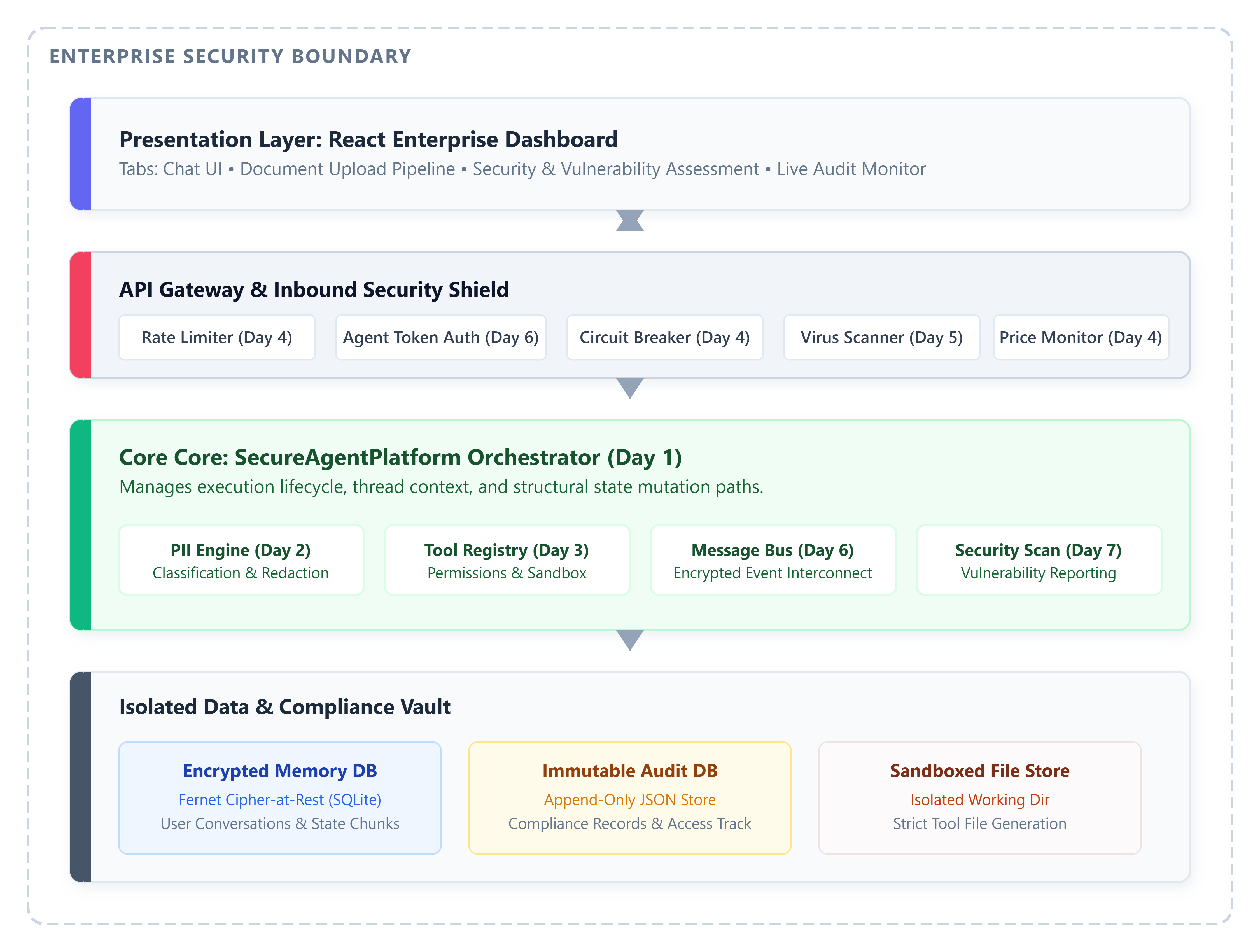
Core Concept: The SecureAgentPlatform Orchestrator
Secure Agent Platform (Python) initializes subsystems in dependency order and exposes one REST surface. A React dashboard maps each tab to a curriculum day.
Document conversion service
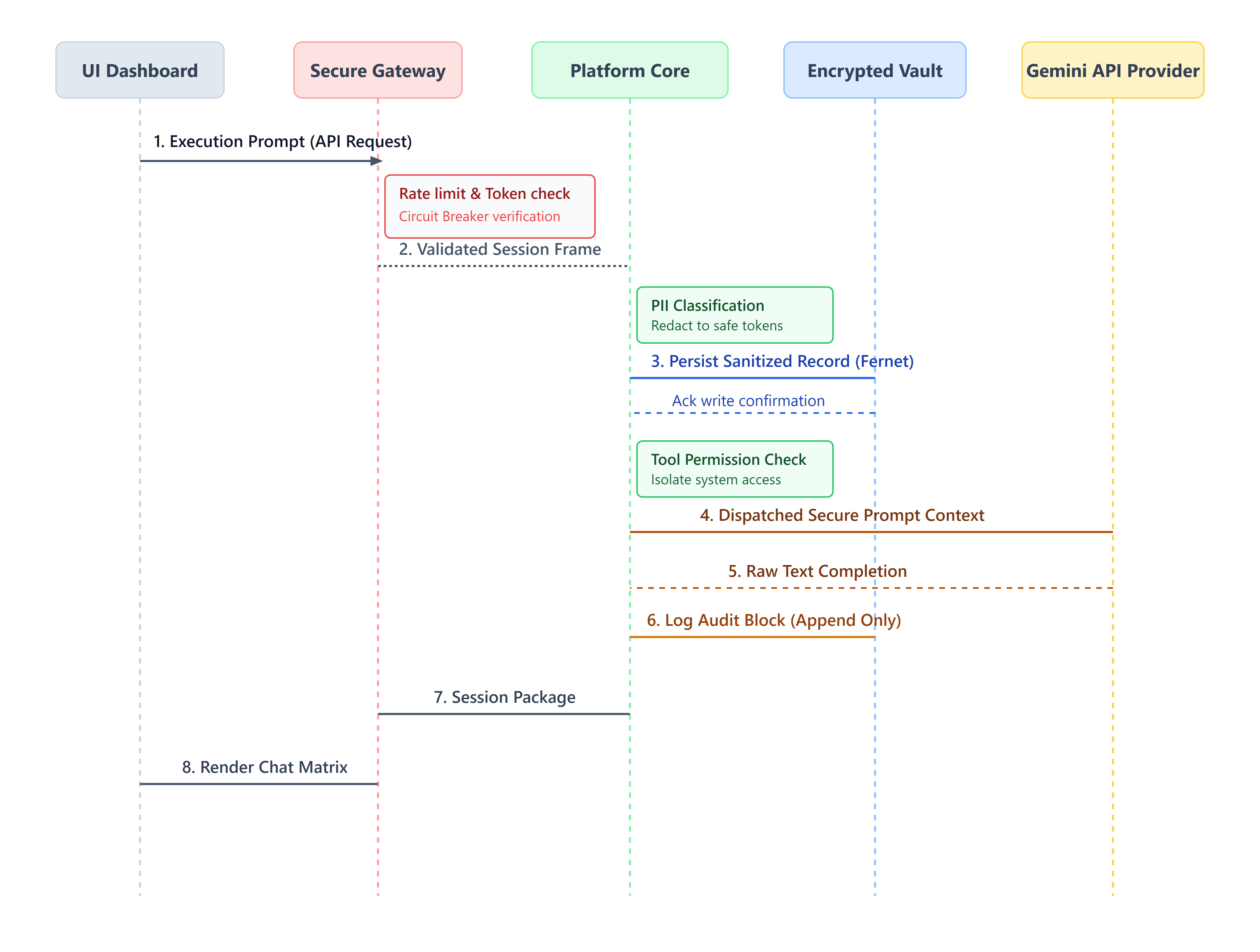
Control flow (integrated chat):
Rate limit check (per user)
Store user message in encrypted memory (PII redacted)
Process via agent lifecycle (encrypted state persist)
Store assistant reply + audit event
Data flow: Plaintext never hits SQLite for memory content — Fernet encryption at rest. Audit entries are append-only JSON in a separate DB for compliance queries.
Day-by-Day Integration (What Each Layer Does)
Day Production responsibility1Init / execute / cleanup lifecycle + structured logs2Conversation memory, PII classification, context compression3Tool registry + capability permissions + sandboxed file agent4Rate limits, circuit breaker, sessions, price monitor5Upload pipeline: virus scan → chunk → classify → encrypt store6Encrypted message bus with agent token auth7Security scan, vulnerability report, performance metrics
Dashboard Design Notes
The UI uses six tabs (not a generic AI purple gradient). Each tab calls a focused API:
Chat: default starter prompt demonstrates PII in input
Documents: one-click sample doc with embedded PII fields
Security: synchronous scan + live audit list
Success criterion: After Run Security Scan, status shows secure or needs_attention and audit lists security_scan_completed.
Implementation Steps
GitHub Link
https://github.com/sysdr/ai-agent-mastery-p/tree/main/Week1/secure-agent-foundations
1. Clone and configure
cd secure-agent-foundations
cp .env.example .env
# Set GEMINI_API_KEY in .env (never commit this file)
2. Install and test
chmod +x setup.sh
./setup.sh
Expected: Backend OK and 4 passed from pytest.
Markdown file upload
3. Run locally
./scripts/start.sh
CheckCommandExpectedHealthcurl localhost:8100/api/v1/health"status":"healthy"Dashboard datacurl localhost:8100/api/v1/metrics/dashboardJSON with platform_statusUIOpen
http://localhost:3100
Six tabs load
4. Functional demo
Chat tab — Send default message; see user + agent lines.
Documents — Click Upload Default Day 5 Document; alert shows chunk count +
pii_detected: true.Security — Run Security Scan; vulnerability status updates; audit shows scan events.
5. Docker (optional)
export GEMINI_API_KEY=your-key
docker compose up --build -d
curl localhost:8100/api/v1/health
6. Cleanup
./cleanup.sh
Removes caches, stops containers, deletes local .env.
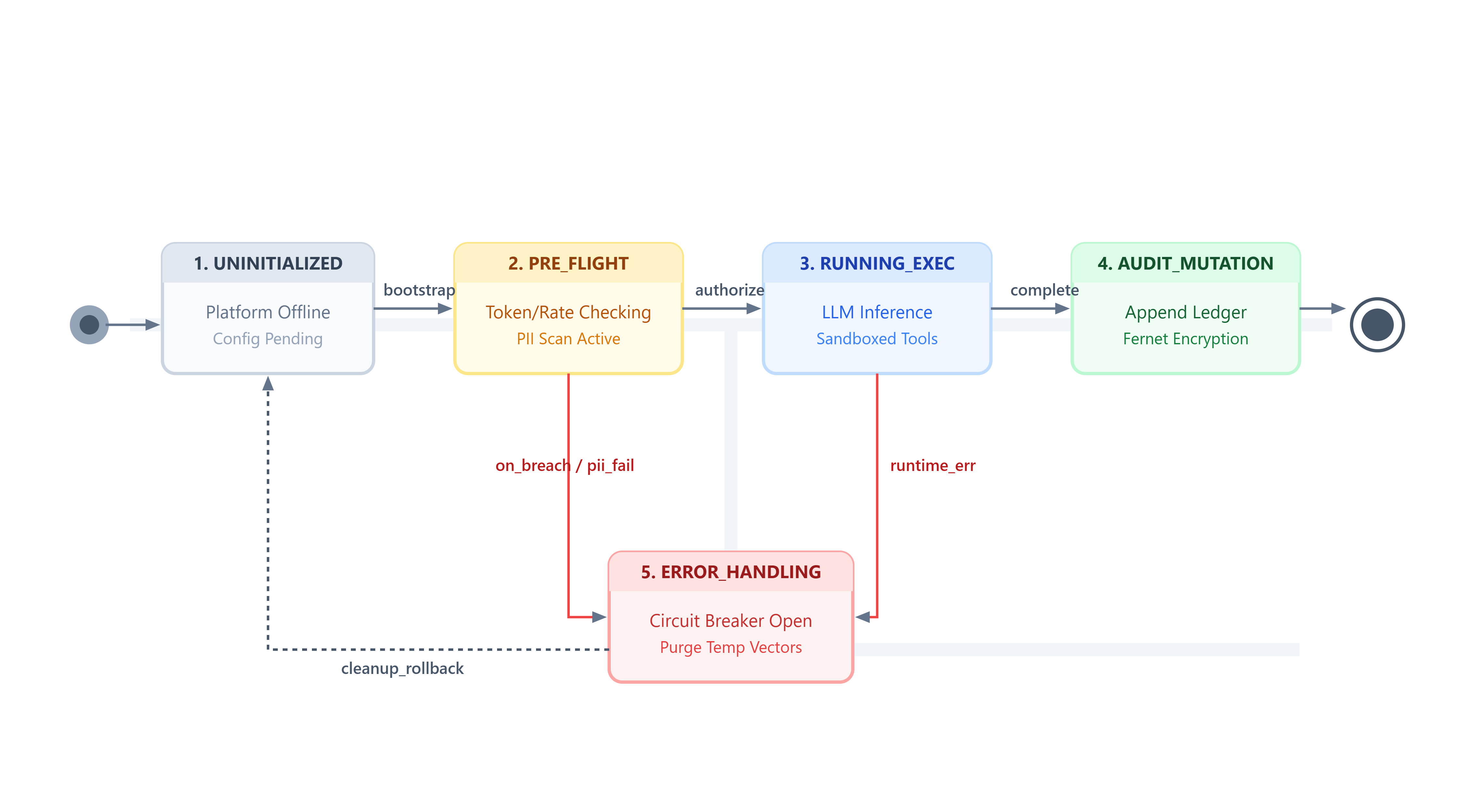
Implementation Guide —
Overview
secure-agent-foundations is the Week 1 capstone for the 30-day course. It integrates seven daily security patterns into one orchestrated platform: a FastAPI backend (SecureAgentPlatform) and a React operations dashboard. The system runs without Redis (in-memory fallbacks) or with Redis for distributed rate limiting and sessions.
Architecture
React Dashboard (3100)
        │ REST /api/v1
        ▼
FastAPI + SecureAgentPlatform (8100)
        │
        ├── AgentLifecycle (encrypted SQLite state)
        ├── MemoryService + PIIDetector
        ├── PermissionManager + ToolRegistry + FileAgent
        ├── RateLimiter + CircuitBreaker + SessionManager + PriceMonitor
        ├── DocumentService
        ├── MessageBus
        ├── SecurityContext + SecurityAssessment + AuditService + PerformanceMonitor
        │
        ├── SQLite (state, memory, audit)
        └── Redis (optional)
Design
Orchestration. SecureAgentPlatform.initialize() registers subsystems in order: audit → security context → permissions → tools → lifecycle → resilience → documents → message bus → performance monitor.
Security context. Agents register with encrypted capability payloads (SecurityContext). Access checks gate tool and bus operations.
Integrated chat. POST /agent/chat chains rate limit → memory (PII-aware) → lifecycle process → audit log.
Degradation. Redis connection failures log a warning and fall back to in-memory rate limiting and sessions.
Assessment. SecurityAssessment.run_comprehensive_scan() evaluates seven production checks and returns a structured vulnerability report synchronously.
API
Base: http://localhost:8100/api/v1
Dashboard / metrics
The React UI exposes six tabs aligned to curriculum days:
Dashboard — module active/inactive chips + request latency/uptime
Chat & Memory — default prompt, PII-aware conversation
Tools & Files — sandbox read/write/list
Web Resilience — price monitor + circuit state
Documents — upload + default PII sample document
Security & Audit — scan trigger, vulnerability summary, audit list
GET /metrics/dashboard aggregates platform status, security coordinator state, performance counters, vulnerability report, recent audits, and circuit breaker state.
Build and run
Local (recommended for development)
cd secure-agent-foundations
./setup.sh
./scripts/start.sh
Verify
curl http://localhost:8100/api/v1/health
curl http://localhost:8100/api/v1/metrics/dashboard
export PYTHONPATH=backend && pytest backend/tests -v
CLI
source venv/bin/activate
export PYTHONPATH=backend
python backend/cli.py status
python backend/cli.py scan
Docker
export GEMINI_API_KEY=your-key   # optional
docker compose up --build -d
curl http://localhost:8100/api/v1/health
# UI: http://localhost:3100
docker compose down -v
Images use official python:3.12-slim, node:20-alpine, and redis:7-alpine.
Tests
Run: pytest backend/tests -v with PYTHONPATH=backend.
Cleanup
./cleanup.sh stops app processes, runs docker compose down, removes venv, node_modules, .pytest_cache, __pycache__, Istio-named artifacts, and local .env.
Summary
Week 1 delivers a single deployable reference for secure agent foundations: encrypted state, audited actions, sandboxed tools, resilient web calls, safe document ingestion, encrypted inter-agent messaging, and measurable security posture — suitable as the base layer for Weeks 2–4 orchestration and production deployment topics.
Assignment
Add a new security check api_auth_enforced to SecurityAssessment that fails if JWT secret equals the default placeholder. Expose result in /metrics/dashboard. Add a dashboard chip showing pass/fail.
Hints: Read security_assessment.py → extend CHECKS → pass platform_status flag from config → render in Security tab.
Youtube demo link:
What You Mastered
You built a multi-capability agent platform with encryption, audit, sandboxing, and measurable security posture — the same structural concerns as enterprise AI systems, at a scale you can run on a laptop.
Next week: Multi-tenant chat, code analysis agents, and production monitoring on top of this foundation.